jason's hyperion blog

essbase from the trenches

JDBC and JNDI connections compared (with a Dodeca example)

Have you ever wondered what the difference between a JDBC and a JNDI connection is? If you’re familiar with at least one of these, it’s likely that you’re familiar with JDBC (but probably not JNDI).

JDBC connections come up often in the Oracle world (for good reason). It’s a standard model/framework for designing drivers that interact with relational databases. As it pertains to us in the Hyperion, Dodeca (and even Drillbridge!) world is that we often define connections in terms of specifying JDBC parameters. This typically means a driver class name (like com.mysql.jdbc.Driver for a MySQL driver), a JDBC URL (a URL specifying a server and optionally a database/schema and other parameters), and credentials (username/password). So if you’ve poked around in your infrastructure much at all, there’s a good chance that you’ve come across a JDBC connection.

You may have even come across something called JNDI and even vaguely known it was sort of an alternate way to configure a connection but never really had to bother with it. I’ll spare you the acronym details, but think of JNDI as a way of organizing database connections (and other objects actually, but we don’t need to worry about that at the moment) such that instead of our app/system having to know the server name and credentials, it just asks “Hello, can I have the resource that was defined for me with name XYZ?”

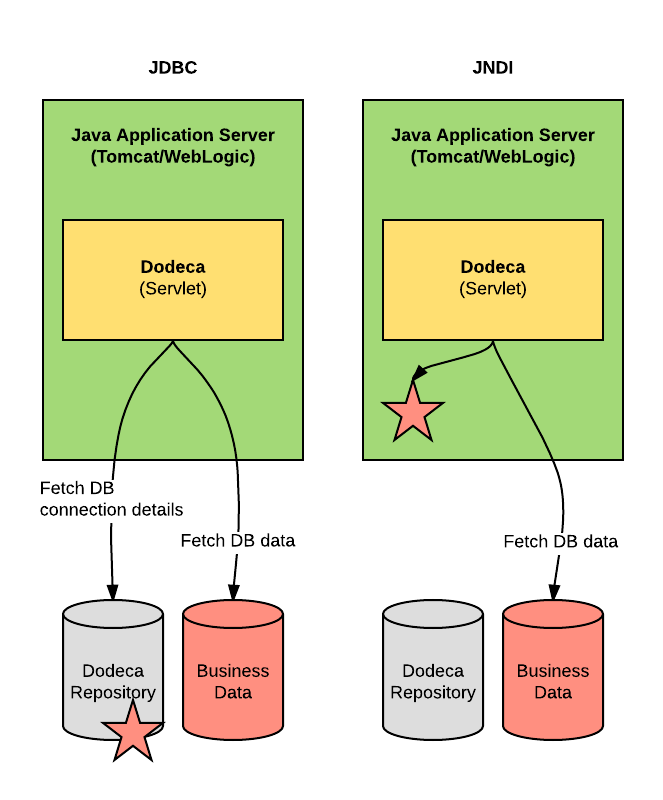
For the application in question, the net result is much the same: a database connection is gained and the database operations are executed as normal. Consider the following diagram that compares these two ways of organizing the database resources, as it pertains to a connection we might want to make from an application such as Dodeca:

JDBC vs. JNDI connections (as it pertains to Dodeca data sources)

In the first, and most common scenario, we have a Dodeca servlet (yellow) sitting inside of a Java Application server (Tomcat in this case). Dodeca talks to its repository and asks for the details for a defined SQL (JDBC) connection (the red star, representing the connection details stored in the repository along with everything else). Given those credentials, Dodeca (the app) then makes a connection to that particular database (the red cylinder) and does whatever with it (executes a SQL query such as SELECT or INSERT). Again, this is the typical configuration scenario.

The nuance to keep in mind here is that at some point in time, the connection details, meaning the JDBC parameters such as driver class, URL, username, and password, had been specified and entered in to the app (Dodeca) and stored in it’s repository.

But what if, for some policy/organizational/legal/technical reason, the powers that be at a given organization decided they didn’t want to have these configuration details in the repository? Maybe it’s due to separation of duties, SOX compliance, or some other reason. But they might say, “You know what? We’ll define the connection for your system and you can grab a connection via its name, but won’t have access to the username/password?”. This would be an organizational situation where JNDI could be appropriate.

With JNDI, the configuration details for the database are now stored in the container itself (as noted by the red star in the green application server/container). So now, the app (Dodeca) would ask it’s parent container “Hey, can I have the connection named XYZ?” and then connect to the proper database (red cylinder) without having to know the driver, URL, username, or password.

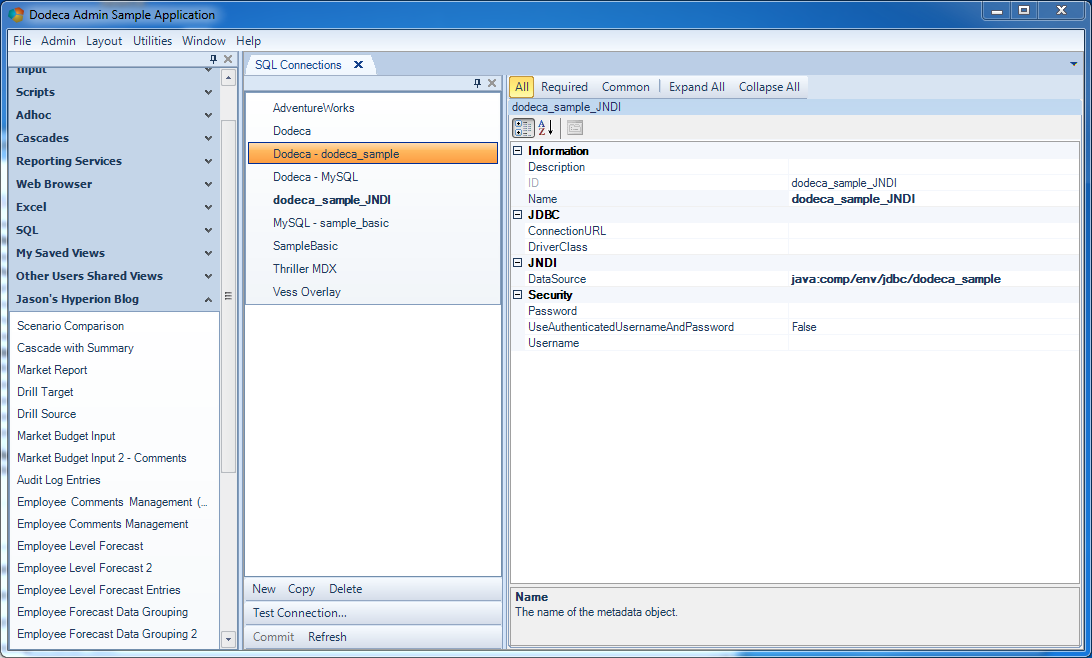
In this case, the connection in Dodeca (or whatever the end system is) is now defined differently (and a bit more simply) as in the following:

Configuring a SQL connection in Dodeca using JNDI

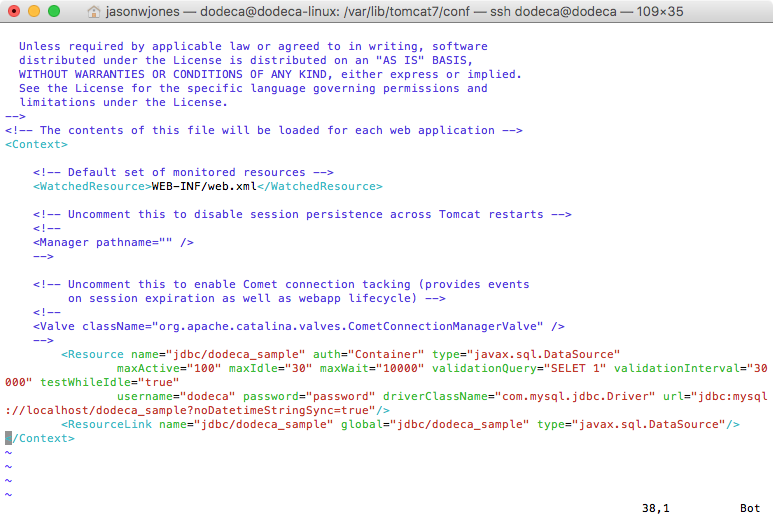
Note the “DataSource” parameter with the JNDI resource name – and node that the JDBC section is empty, along with the Security section. Each container, be it Tomcat, WebLogic, or whatever, has its own way for defining JNDI resources, but in Tomcat, it might look like the following:

Configuring JNDI connection in Tomcat

The preceding is a screenshot from a configuration file for Tomcat that defines resources. The entire Resource tag is used to define the connection by giving it a name, specifying some parameters, the driver class, and any pertinent configuration details.

As I mentioned, at the end of the day, the end result is much the same: the application gets a connection to a database one way or another and operations are executed as normal. I find that the reason for using a JNDI connection is typically less technical than organizational. Specifying resources this way can also be useful if you want to let the target app use the same configuration between development/QA/environments, although given the way that Dodeca organizes connections, it isn’t an issue.

Hacking the Essbase Java API to run Application Calcs

This post might alternately be titled, “So you’re really stubborn and wasted a couple of hours messing with the Essbase Java API”, or something. I was in a discussion the other day and asked about the ability to run an application-level calc script.

Well, back up, actually. Did you know that calc scripts can exist at the application level in Essbase? For a very long time, Essbase has had this notion of applications and databases (with databases often just being called cubes), such that there is usually one database/cube inside of an application, but there can technically be more (at least in the case of BSO). It’s almost always the best practice to have just one cube to an application. This is largely for technical reasons.

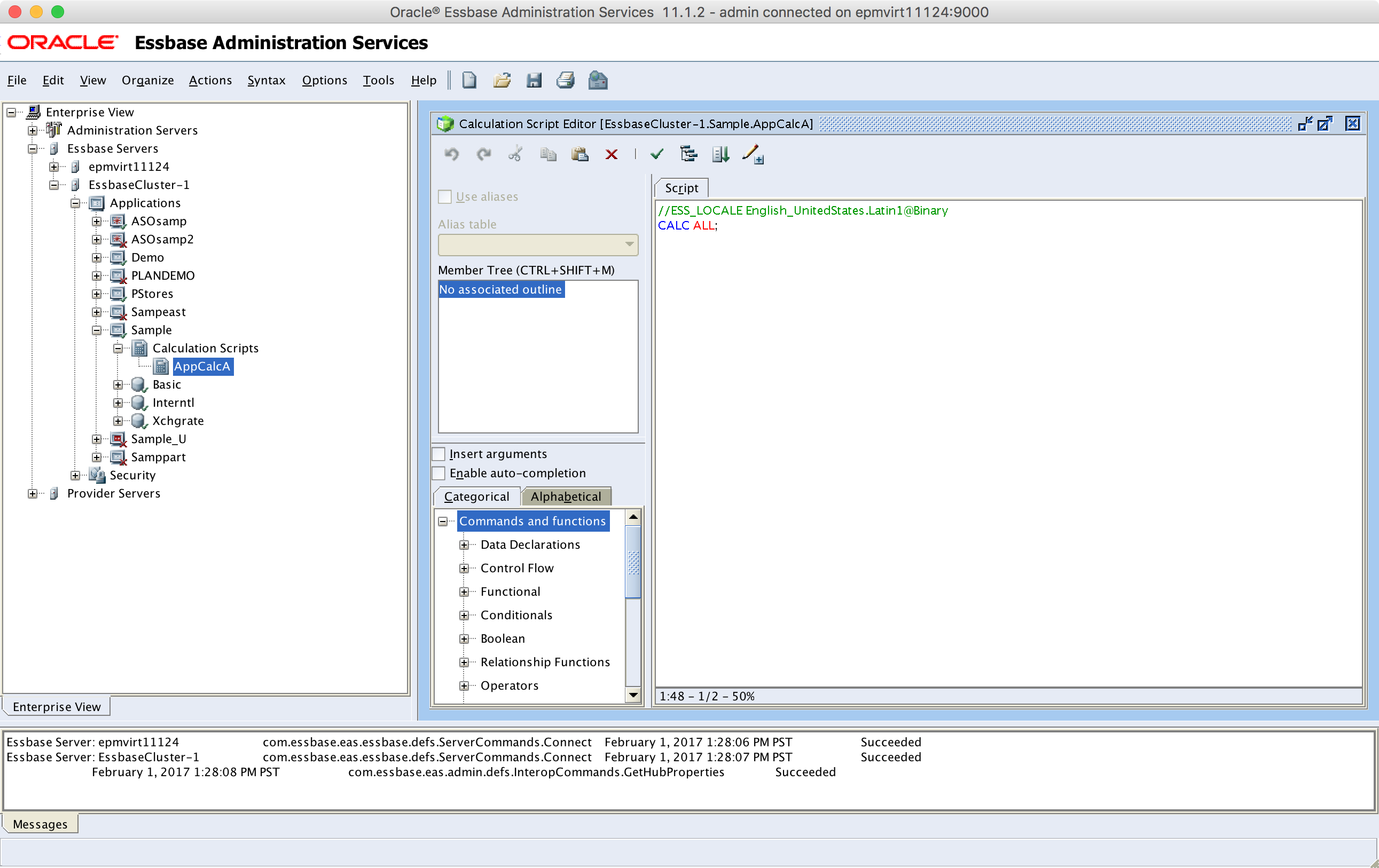
That said, while objects like load rules and calc scripts typically exist within the folder for a given cube, they can technically be located inside of the application itself. In theory you might want to have a calculation script that is applicable to multiple cubes in an app, and would want to centralize it in the application. Here’s a screenshot of the Sample app showing that there is, indeed, a calculation script located in it (that I have placed there);

An application-level calc script on Sample

The most generous thing I can think to say about application-level objects like calc scripts and load rules is that they are essentially a vestigial organizational paradigm from yesteryear. While Oracle hasn’t gone out of their way to prohibit their use, they haven’t gotten any love (nor would they necessarily warrant it). You can’t create them directly in EAS (you can copy an existing script from a cube, which is what I did for the above screenshot). You can’t run them from Smart View. I don’t believe there is a way to grant access to them from Shared Services (cube level calcs, no problem).

You can technically run them using MaxL and run them from EAS.

What you can’t do, however, is run them using the Essbase Java API. That’s where this post comes in. I was really wondering if it was possible to run an app-level calc using the the Java API. But there’s no method for it. The typical method you’d use is calculate() on an IEssCube interface. But there’s no equivalent method for an IEssOlapApplication. Usually you pass a calc script name to the calculate() method, but you can’t try and trick it with a relative folder path or pass in null or something.

However, the old C API for Essbase could run an app-level calc. It turns out there’s a function there that can take null for the cube parameter and will just assume the calc lives in the app.

Surely, I thought, there’s a way to make this happen or maybe trick the Java API into doing my bidding for me. I thought that maybe if I could get the Essbase Java API to pass a null cube name in for me, I could maybe trick it. I took a look at the bytecode (compiled files in the Essbase Java API) and found that it’d be impossible, actually, to try and supply an arbitrary cube name to the calculation function, because of the way that it reads the cube name from the class itself.

That said, there appears to be a very dirty/hacky way to trick the IEssCube implementation into passing a null value in and getting the underlying C API function to execute the app-level calc.

The trick is to subclass EssCube (the implementing class for IEssCube) and selectively override a couple of methods so that when the calculation method is invoked, it reads our fake cube name of null, then executes the calc.

Anyway, here’s a GitHub Gist with the sample files for tricking the Java API into running an app-level calc. The real trick is to allow for specifying a fake name as well as also overriding the setActive() method that is called internally int the Essbase Java API so that it doesn’t just blow out the fake value we’re supplying.

So, when would you use this? The answer is never. You should never, ever, ever do this. It’s using a private API class (bad!), to facilitate a functionality that is of marginal usefulness in the first place, is rarely used, and isn’t getting much support.

Nevertheless, in some ways it’s an interesting example of being stubborn hacking an API to try and do your bidding when the out of the box functionality isn’t quite sufficient.

Showing off the power of Drillbridge query translation

Lately I have been working on new materials and demo ware to help show off the power, flexibility, and sophistication of both the Dodeca Spreadsheet Management System and Drillbridge/Drillbridge Plus. I came across a really great Drillbridge mapping example today that I hadn’t specifically solved before, but with a little creativity I was able to write the proper Drillbridge query and get exactly what I wanted.

Consider an Essbase cube with the following dimensions:

  • Years: FY15, FY16, etc
  • Periods: Periods/Quarters/Months
  • Scenario: Actual, Budget
  • Departments: balanced hierarchy with four levels
  • Location: Total/Division/Store
  • Measures: Ragged hierarchy with accounts at level-0

For this post I am going to design a Drillbridge query that maps from this cube back to its related relational data, with the additional wrinkle that we want upper-level drill in several dimensions, including one where the dimension in the cube is represented by two different columns in the source data.

Here’s a screenshot from EAS of what this looks like:
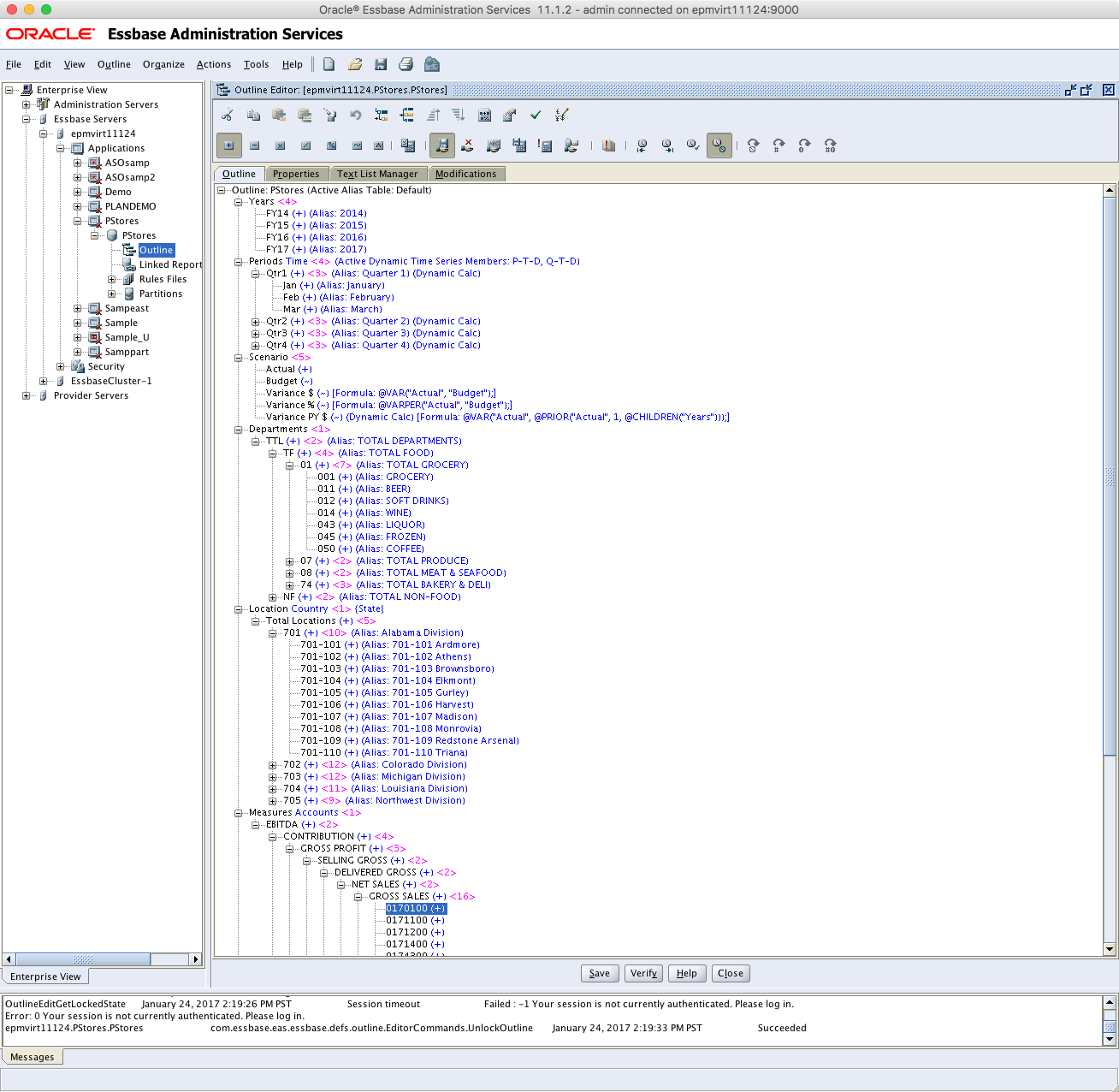
Overview of dimensionality for retail cube

Let’s now turn our attention to the underlying transactional data that we want to drill to:
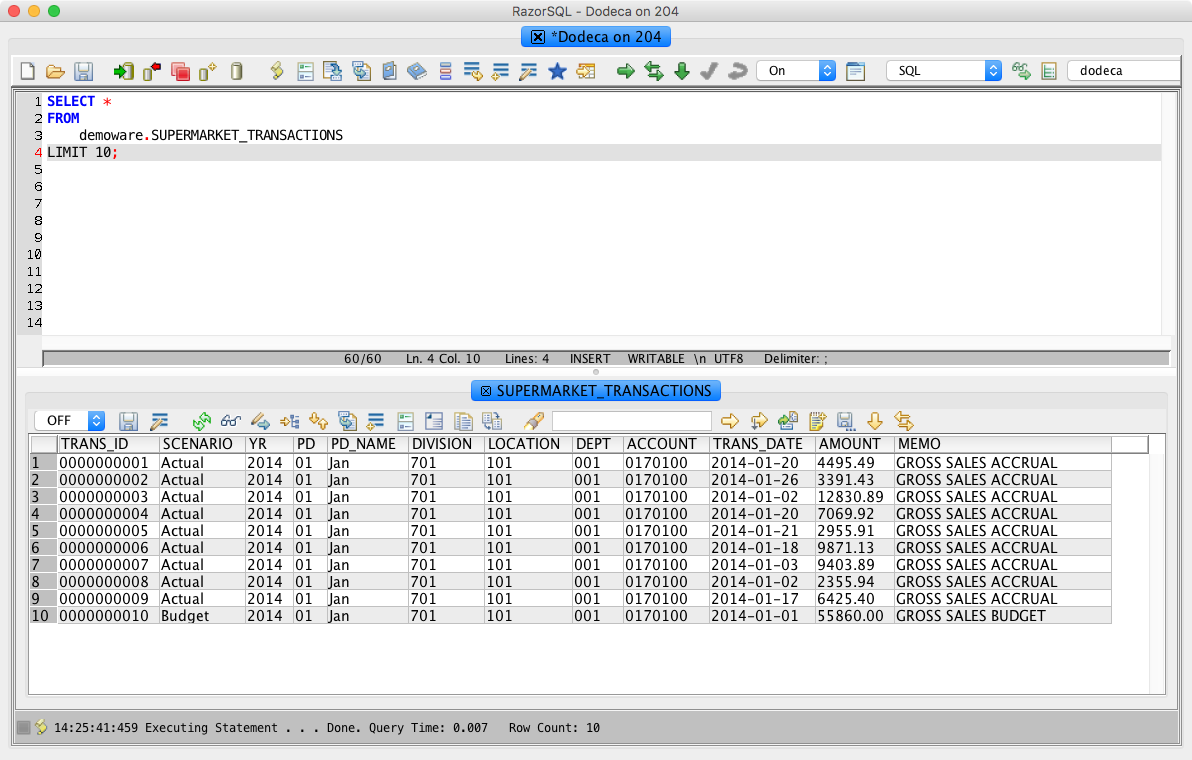
Example of upstream transactional data for retail cube

The upstream transaction data adds a few things that aren’t present in the cube, such as a transaction ID, transaction date, amount, and a memo. In terms of mapping from the cube members to the columns of data, things are fairly straightforward. The Scenario values are exactly the same, so that’s easy. The period is represented numerically as well as with a three-letter month (“Jan”), so that’s easy as well (if we didn’t have the three letter month name in the relational data, we could just easily use a built-in Drillbridge function that converts month names to numbers). The account is also a straight mapping. The division and location are a little interesting, however.

Notice in the cube that each entity/location is made up of its three digit division, a hyphen, and a three digit location number, such as 701-101. This is actually really easy to accommodate in Drillbridge because the Location will be passed in and it’s easy enough to use the substring function to get the first three digits and the last three digits.

Where things get interesting, however, is if we want to provide upper-level drill in the Location dimension. As an example, this is what we might need/want a generated query to look like:


SELECT 
	* 
FROM
	SUPERMARKET_TRANSACTIONS 
WHERE 
	YR = '2014' AND
	PD_NAME IN ('Jan', 'Feb', 'Mar') AND
	SCENARIO = 'Actual' AND
	DEPT IN ('001') AND
	ACCOUNT = '0170100' AND
	(DIVISION, LOCATION) IN (('701', '101'), ('701', '102'))

Note that this code example is for MySQL, the syntax and technique varies a bit for Oracle or Microsoft SQL Server. Pay particular attention to the last line. Remember, in this table, the division and location are separate columns but are derived from a single incoming value or values. In order to properly check for the proper values (in the case of multiple locations) we actually need to verify that a given tuple (such as ('701', '101') of values exists. If the user drills from an upper level member in the Location dimension, you can kind of imagine that multiple level-0 members area going to be processed for Location token, such as 701-101 and 701-102 (to be clear, Drillbridge only handed a single member that was actually drilled on, Drillbridge takes care of figuring out the descendant members, whether it is from Essbase or PBCS).

So, knowing that, we can carefully construct the proper Drillbridge token to generate the query that we need. And here’s what that token expression looks like:

\"('\" + #Location.substring(0, 3) + \"'\" + ', ' + \"'\" + #Location.substring(4) + \"')\"

This looks kind of gnarly, but let me break it down for you. When you drill from upper level members in Drillbridge, Drillbridge gets all of the levef-0 descendants of the drilled member, applies them one at a time to your expression, then joins them all together (such as with a comma) in order to generate the final expression that is dropped in to the query. So first of all, the expression above, when applied to a single incoming member name (like 701-101) will generate this: ('701', '101').

The reason for the backslashes is to escape the double quotes. So from left to right we have this:

  • Start with an opening parenthesis followed by a single quote: ('
  • Apply the substring function to the value in the #Location variable. Substring is the Java String function of the same name, which is given a starting character (strings start with character 0, and an ending character (exclusive), such that the substring of the incoming value 701-101 will be 701.
  • Add on a single quote and, comma, a space, and a single quote: ', '
  • Now use substring on the location variable again but this time to get the last three characters, so that 701-101 becomes just 101, for example
  • Follow that all with a closing parenthesis: )

Drillbridge will automatically join all of the individual values with commas and surround the whole thing with parentheses. Also note that the reason we are treating the division/location as strings (and quoting them) is because in this case, they are strings (more specifically, they are CHAR(3) columns in this table).

All that said, here’s our final Drillbridge query, complete with turning on drill to bottom for various other tokens:


SELECT * 
FROM
	SUPERMARKET_TRANSACTIONS 
WHERE 
	YR = '{{"name":"Years","expression":"'20' + #Years.substring(2)","sampleValue":"FY14","overflow":"","overflowAt":0,"flags":""}}' AND
	PD_NAME IN {{"name":"Periods","expression":"#Periods","drillToBottom":true,"sampleValue":"Qtr1","overflow":"","overflowAt":0,"flags":""}} AND
	SCENARIO = '{{"name":"Scenario","expression":"#Scenario","sampleValue":"Actual","overflow":"","overflowAt":0,"flags":""}}' AND
	DEPT IN {{"name":"Departments","expression":"#Departments","drillToBottom":true,"sampleValue":"001","overflow":"","overflowAt":0,"flags":""}} AND
	ACCOUNT = '{{"name":"Measures","expression":"#Measures","sampleValue":"0170100","overflow":"","overflowAt":0,"flags":""}}' AND
	(DIVISION, LOCATION) IN {{"name":"Location","expression":"\"('\" + #Location.substring(0, 3) + \"'\" + ', ' + \"'\" + #Location.substring(4) + \"')\"","drillToBottom":true,"sampleValue":"701","quoteMembers":false,"overflow":"","overflowAt":0,"flags":""}}
ORDER BY TRANS_ID

One of the really great features in Drillbridge Plus is the token editor GUI that makes editing token parameters in queries a snap. Here’s a screenshot of editing our kind of complex Location token in the editor:
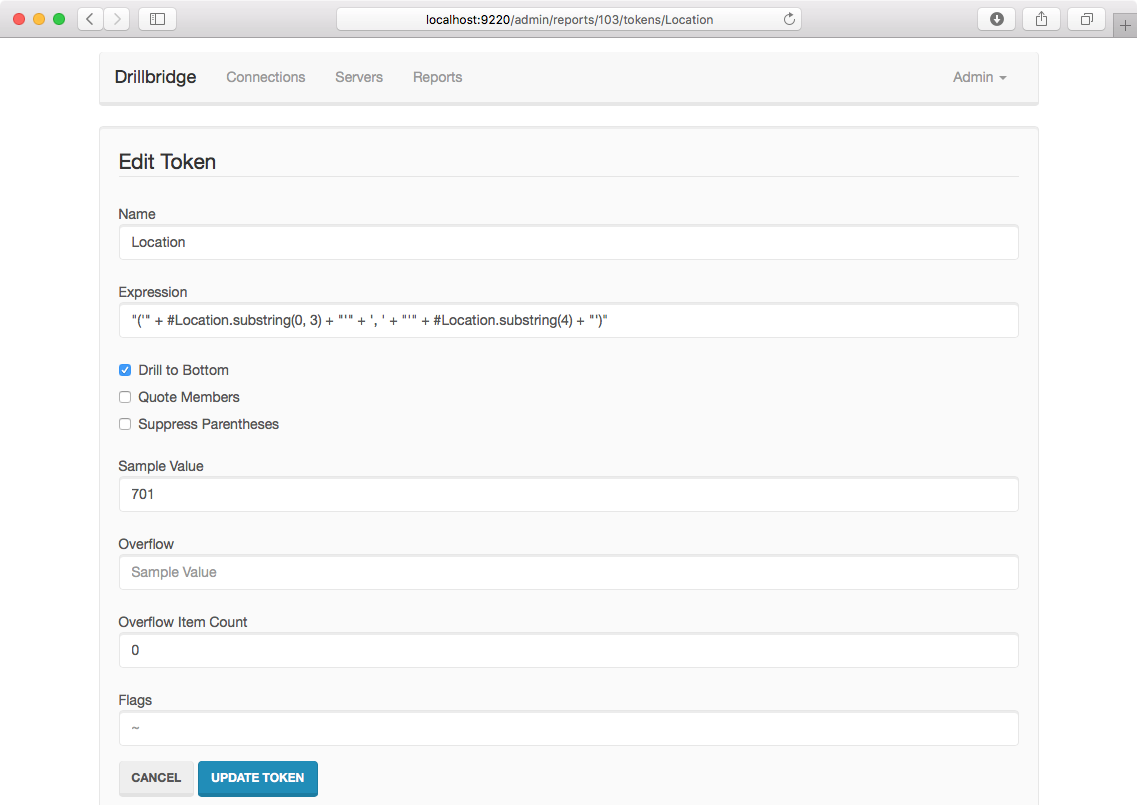
Details of token for Locations in Essbase cube

Back over to the report configuration itself, we also need to make sure to set the Essbase Connection for this Drillbridge report definition, because Drillbridge needs to know which cube to inspect in order to determine what the level-0 members are:
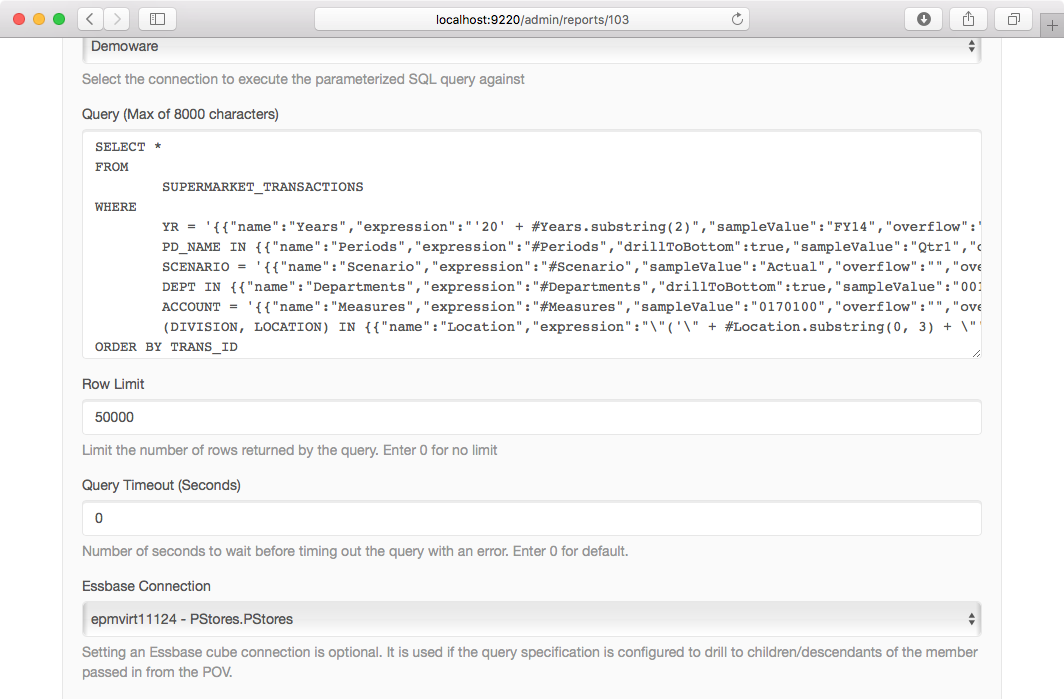
Drillbridge query configuration and related Essbase connection

Just for fun, let’s also tweak a couple of the options available on this report type. Of particular interest is that I want dates to be formatted nicely (Smart Formatting) and I want to turn on auto numbering, which will cause a column to be sliced in automatically with the current row number (I could achieve this in SQL but it’s really easy to just turn on the Drillbridge feature):
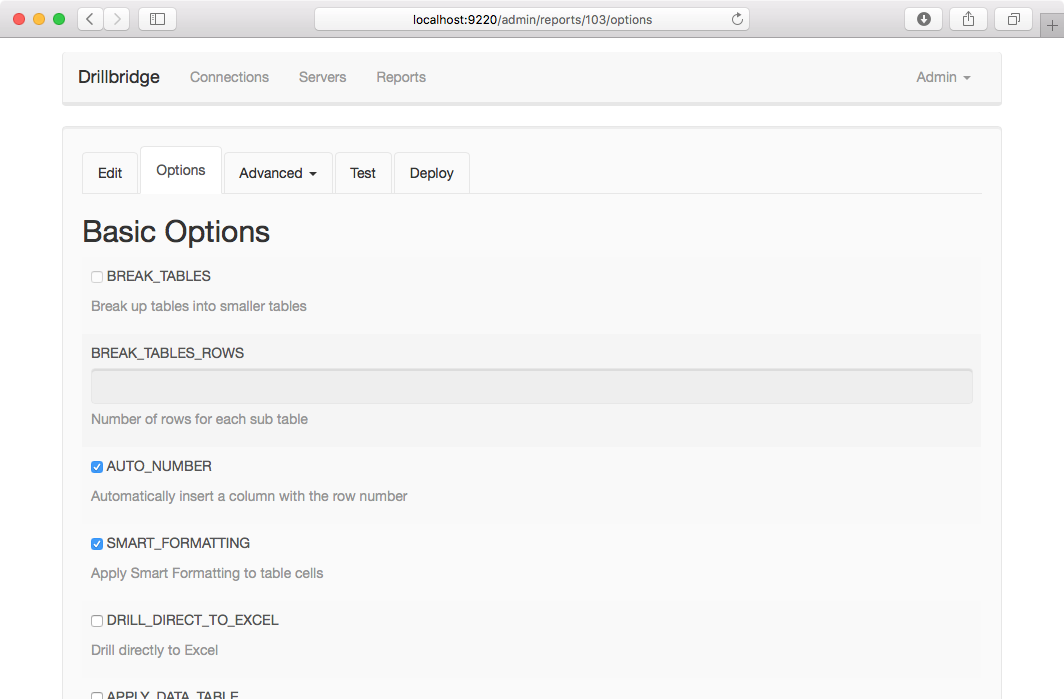
Adding a couple of convenience options to drill-through configuration

With all of that configuration out of the way, we are now ready to test things out. Nicely enough, I have defined “sampleValue” parameters for all of the tokens, which means when I go to test the report configuration out, the boxes are all filled in for me. This is one of my favorite features because it saves a ton of time during development:
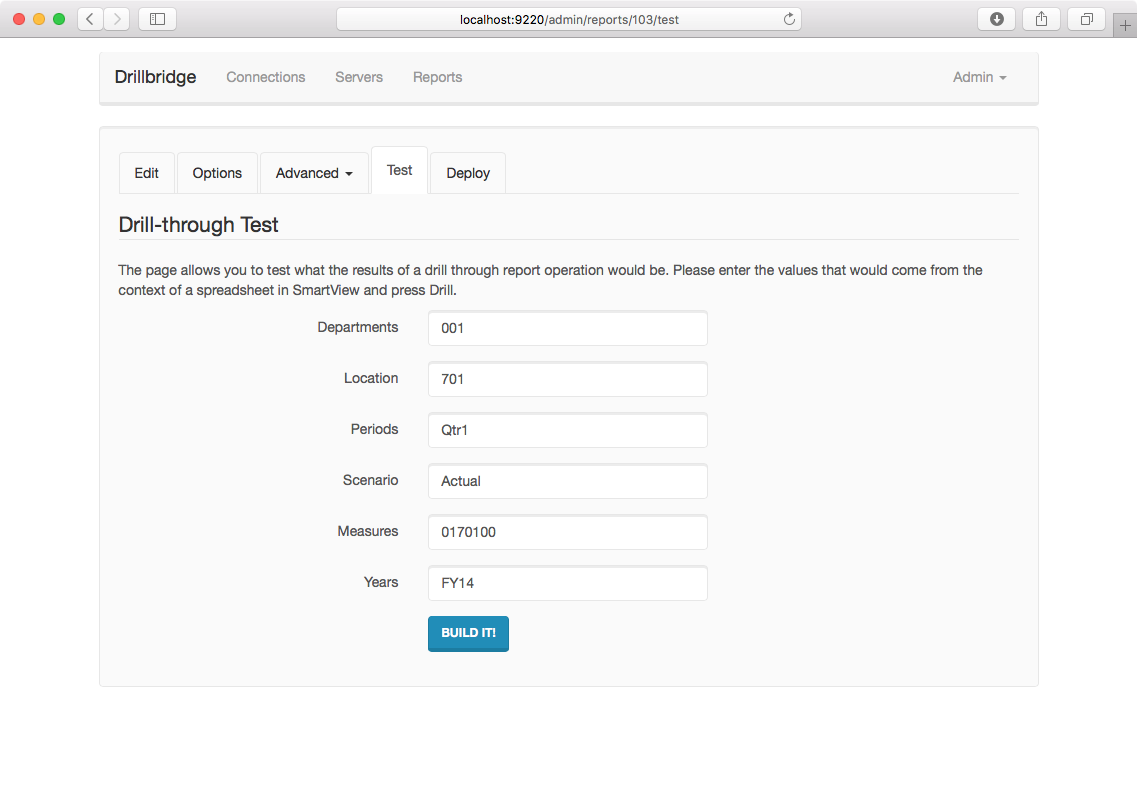
Testing the drill-through definition

Of particular interest in this test configuration is that you can see I am drilling on a division (because I want to make sure my upper-level drill is working properly) as well as an upper level time member (Qtr1) so I can also make sure that that’s working. Here are the results of executing the report:
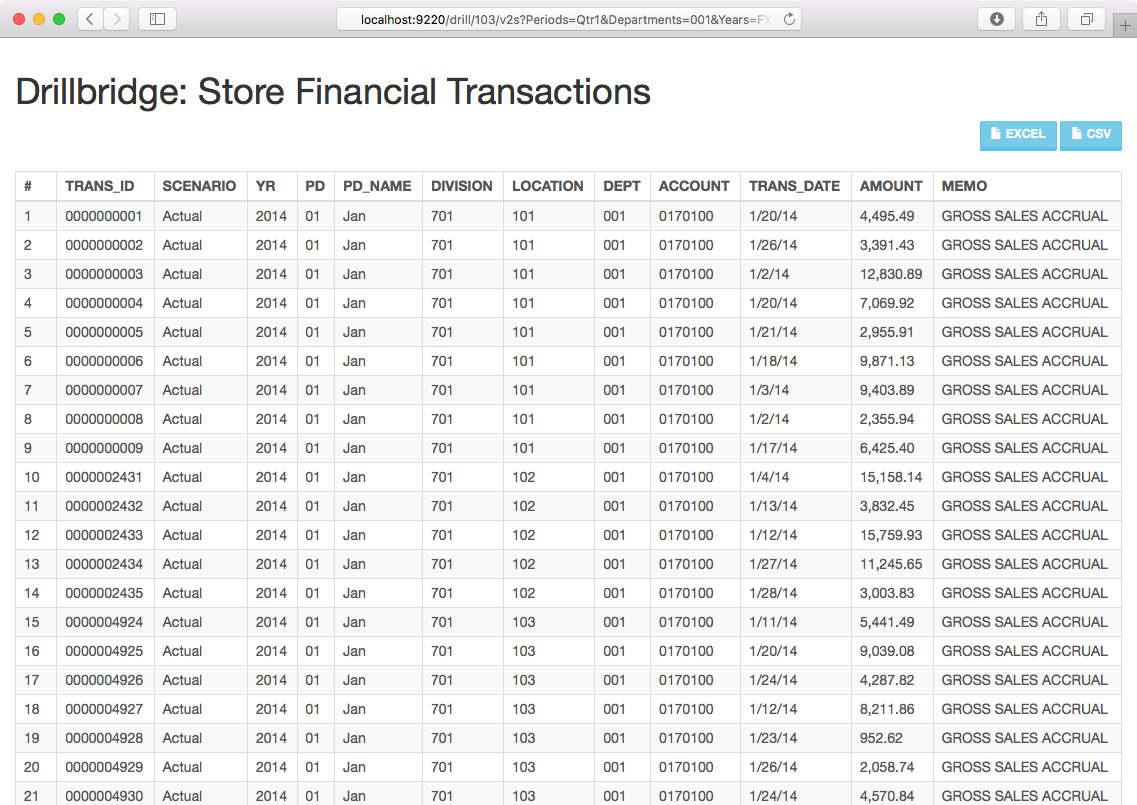
Data comes back exactly how we wanted it

I’d be lying if I said I got this to work on the first try (I always forget a comma or quote somewhere), but here we are, with our auto number column, automatic formatting on the dates and amounts, and more importantly, all of the proper data for all locations under the division we wanted to see. After this, I defined a quick deployment spec (not pictured) to allow for upper level drill in the Location dimension (and others), deployed it to the cube, and fired up Smart View to verify the drill-through to be working.

After quickly getting my ad hoc sheet configured (and using the bright neon lime green to highlight drillable cells), I set things up just right in order to test the same intersection from Smart View (meaning drilling on a quarter and a full division). Here’s the sheet as well as the results of the drill-through request:
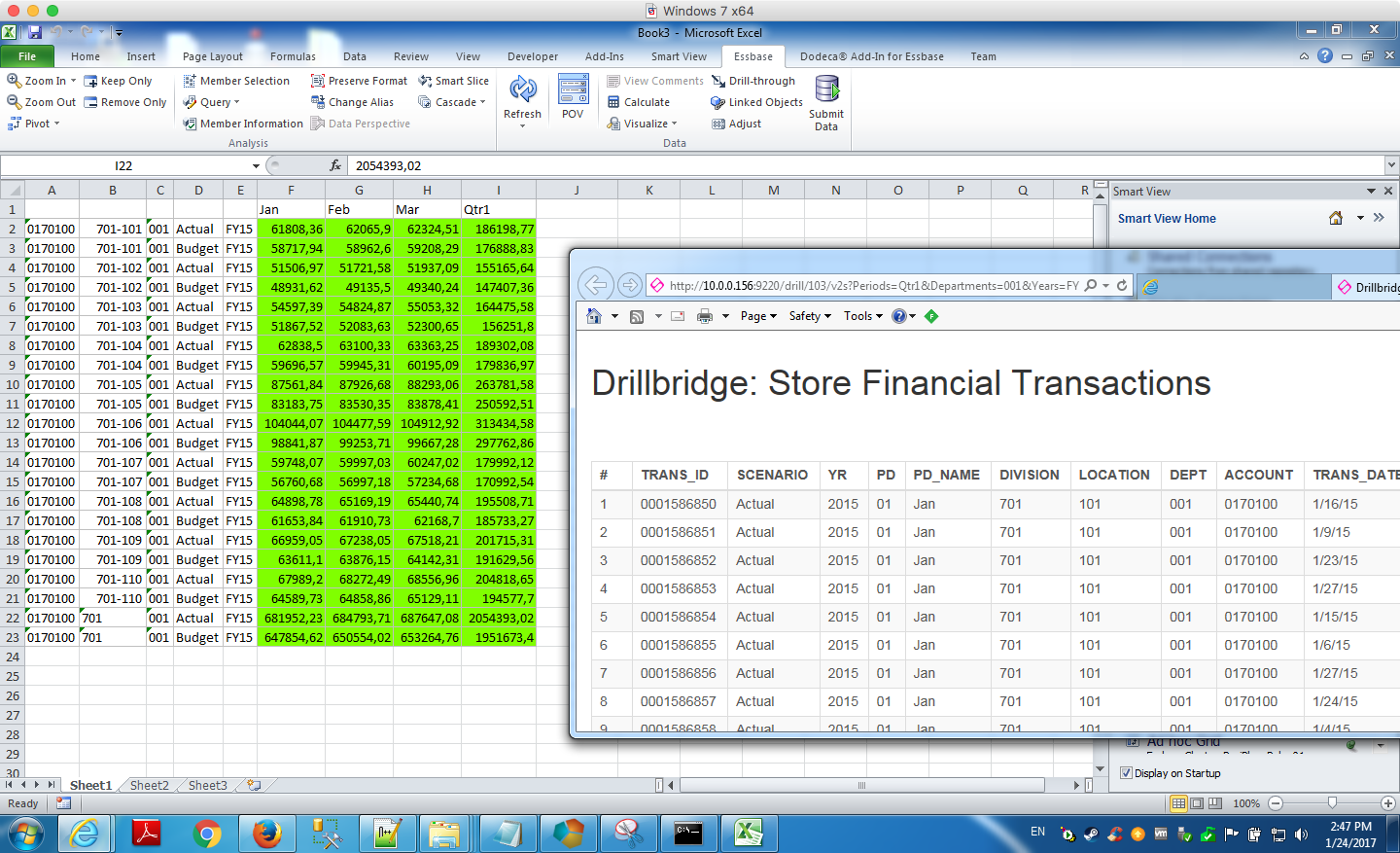
Testing the drill definition in Smart View

Summary

I really enjoyed being able to use Drillbridge to map data from the cube to relational for this non-trivial mapping example. I think this was a really nice, clean approach that retrieved the exact data that we wanted. Another way we could have solved this and kept the Division/Location mapping even simpler would have been to actually just use a view to combine the division and location with a hyphen, then we could compare the values from the Location dimension directly. This technique is often employed when you have control of the target database and you just want to keep your Drillbridge query as simple as possible (as in all tokens are just passed right through with no adjustment). Either approach works just fine, although often there’s no ability (for technical/security reasons) to put in custom views. You can also use an ETL tool to extract out the data you need (and map it in to a format that’s conducive to the cube) but then you are introducing more moving parts and more development effort. One of the reasons so many companies are enjoying Drillbridge is that it keeps the development time (and moving parts) down to a minimum.

Deleting multiple files from PBCS using PBJ client

Earlier in the week, my archnemesis colleague Cameron Lackpour hosted a guest blog article by Chris Rothermel with a trick for deleting multiple files from PBCS using the epmautomate tool. The basic idea is that you can use the listfiles command to export the list of files to a temporary file, then use some batch scripting to iterate over every line in that file, then call epmautomate to delete the specific file. It’s a good example that will undoubtedly come in useful for many people.

Upon reading the article I thought it would interesting to do the same thing, but using the PBJ library. The PBJ library is an open source, 100% Java library for interacting with PBCS via its REST API. It can easily be dropped in to enterprise Java projects by including its dependency in your Maven configuration file (if you’re so inclined). The PBJ library is also used in at least one major piece of software: it’s the library that allows Drillbridge to perform upper level drill from PBCS to a relational database.

That all said, one of the nice things about having a domain specific library in a high-level language such as Java is that it is sometimes very easy and straightforward to implement functionality that doesn’t come out of the box. This doesn’t make it better than the batch scripting technique, just different.

Here’s the whole code file:


package com.jasonwjones.pbcs.misc;

import com.jasonwjones.pbcs.PbcsClient;
import com.jasonwjones.pbcs.PbcsClientFactory;
import com.jasonwjones.pbcs.TestHarness;
import com.jasonwjones.pbcs.interop.impl.ApplicationSnapshot;

public class DeleteAllFiles extends TestHarness {

	public static void main(String[] args) {
		PbcsClient client = new PbcsClientFactory().createClient(createConnection());
		
		for (ApplicationSnapshot snapshot : client.listFiles()) {
			client.deleteFile(snapshot.getName());
		}
	}

}

Most of this is pretty standard boilerplate Java. You can that after we setup a PbcsClient instance, we can very easily get a list of files (using listFiles()), and then iterate over those. To delete a file, we can use the deleteFile(String filename) method and pass in the actual file name from the “snapshot” object (which also contains a little bit of other information).

That all said, as I’ve written before, the best tool for the job is the one that fits in to your environment the best and is easiest to maintain. If you’re doing much in the way of batch scripting, then epmautomate is probably going to fit into your environment the best. If you’re writing an enterprise app in Java, you’re going to absolutely want to use the PBJ library rather than try and execute shell commands.

Hyperion Parent Inferrer Updated (after four years!)

I had a need for the Hyperion Parent Inferrer functionality for an internal project I am working on. It didn’t quite do what I needed out of the box so I updated things a bit. As quick background, the Hyperion Parent Inferrer is a simple one-off Java program/library I developed (apparently four years ago, wow) to parse indented data into an explicit parent/child file.

There are a few (apparently rare) cases where this is useful. In my case, I was modeling some hierarchical data and I find the indented format to be much easier on the eyes. Like so:

Time
 Q1
  January
  February
  March
 Q2
  April
  May
  June
 Q3
  July
  August
  September
 Q4
  October
  November
  December

But when it comes time to load in to Essbase, clearly we need something more explicit. The Hyperion Parent Inferrer takes that preceding as input and then outputs something like the following:

,Time
Time,Q1
Q1,January
Q1,February
Q1,March
Time,Q2
Q2,April
Q2,May
Q2,June
Time,Q3
Q3,July
Q3,August
Q3,September
Time,Q4
Q4,October
Q4,November
Q4,December

The program has been enhanced to allow for a custom indentation character (such as tabs), to be able to specify the text rendered when there is no parent (instead of null), and a couple other little cleanups.

Hyperion Parent Inferrer is free, open source (Apache Software License version 2), and can be run as a standalone command-line Java program or as a Java library that can be incorporated into a typical Java program. The updated code is available at the Hyperion Parent Inferrer GitHub page.

Essbase Renegade Members Revisited

For some reason the other day I was thinking “Whatever happened to that renegade members feature?” So I did some digging.

Renegade members, by the way, refers to this concept where instead of a data record being rejected, you can map it to some other member. Other names for this feature might have been “shovel members”, but renegade members sounds cooler. That said, it’s a feature with a cool name but an apparently terrible publicist.

Renegade members were blogged about as early as a few years ago, such as on Cameron’s blog (during the 2013 OpenWorld), in Russian (apparently), and even over at Rittman Mead’s blog (before Mark spent his days trying to get tea kettles to work with the internet, but I digress).

But there’s a a curious lack of information on renegade members since then. There is, however, just enough information on the internet to piece this together. There’s a little documentation about renegade members over on the official documentation. Just as important (for my purposes), there are two methods relating to renegade members that are in the Essbase JAPI Javadoc.

Typically when something is in the JAPI, there is a fair chance that functionality is in EAS as well. And since the renegade member is related to the dimension object (IEssDimension) I went hunting around in EAS for any sort of menu/right-click setting or anything that would let me select the renegade member. It may exist, but I couldn’t find it anywhere. So right now my assumption is that it doesn’t have a GUI to manage it (at least in EAS). Further, there doesn’t seem to be any MaxL syntax to update the renegade member. So that leaves us with literally these two JAPI methods to update things.

A Few Hours Later in Java Land

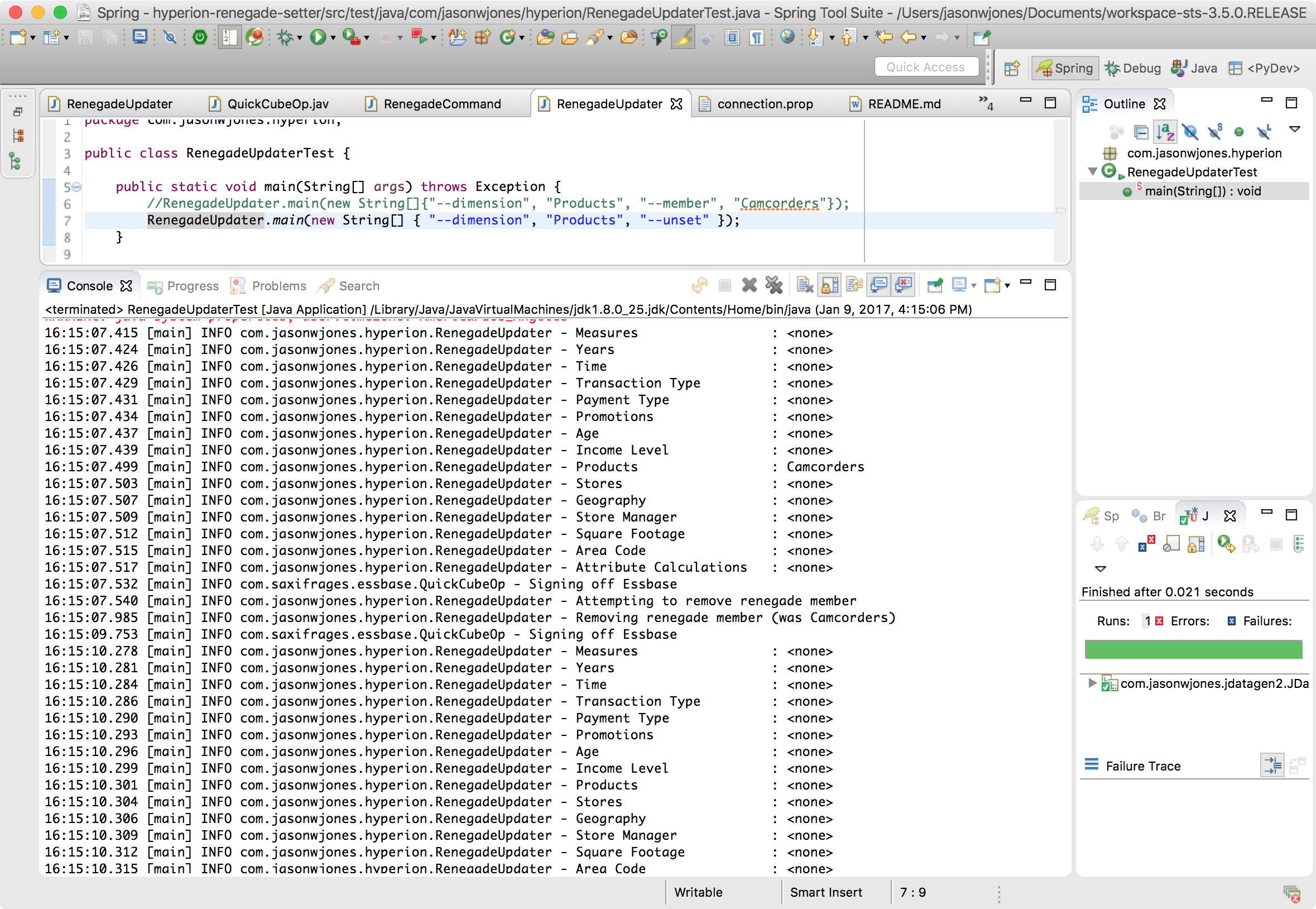
Not to be deterred by a lack of GUI or commonly accepted form of administering an application, I whipped up a quick and dirty Java app to try and update the renegade members for a given dimension. You won’t be able to compile it and run it out of the box (it relies on some private libraries I’ve developed that aren’t public), but you can check out the code such as it is over on a GitHub project (imaginatively titled Hyperion Renegade Setter) I created.

Basically, it takes a given Essbase connection and a dimension/member, then tries to update that dimension’s renegade member. It also allows for clearing the renegade member. These APIs are little bit touchy but I think I have the sequencing right. Of course, there is absolutely no warranty expressed or implied, so caveat emptor.

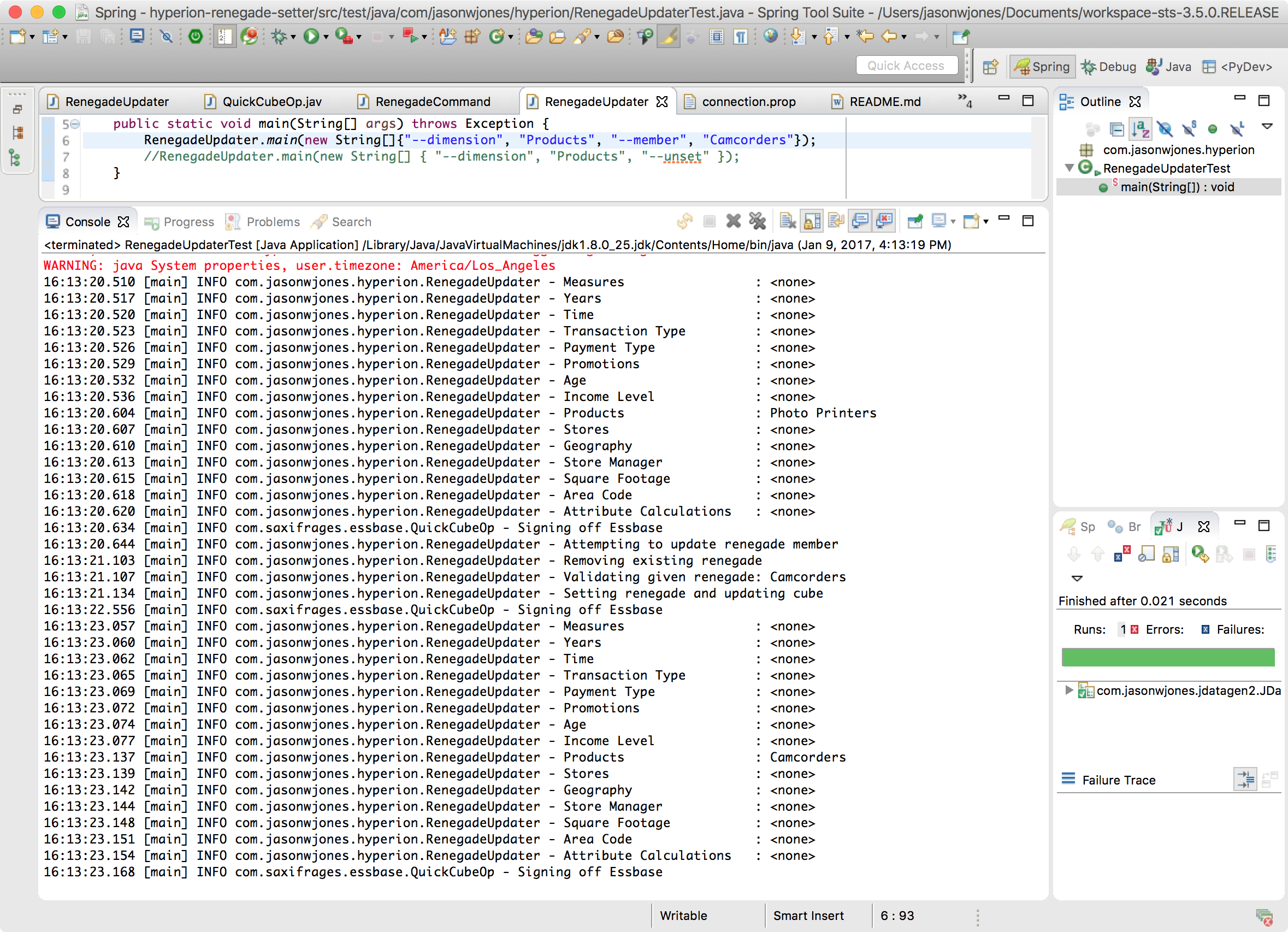
Here’s an example of setting the renegade member for the Products dimension:

Example command for updating renegade members in a cube

And an example of clearing it:

Example command for clearing renegade member in a dimension

Please note that the code here is simulating running on the command-line. I haven’t gone so far as to compile this for the command line and actually run it there, but if you’re dying to do so and don’t want to mess with adapting the source code online, send me an email and I can make available.

Also, sidenote: renegade members are only available on ASO databases, not BSO (nor hybrid, one assumes). So for these examples I’m working on a copy of ASOSamp/Sample instead of the classic Sample/Basic database.

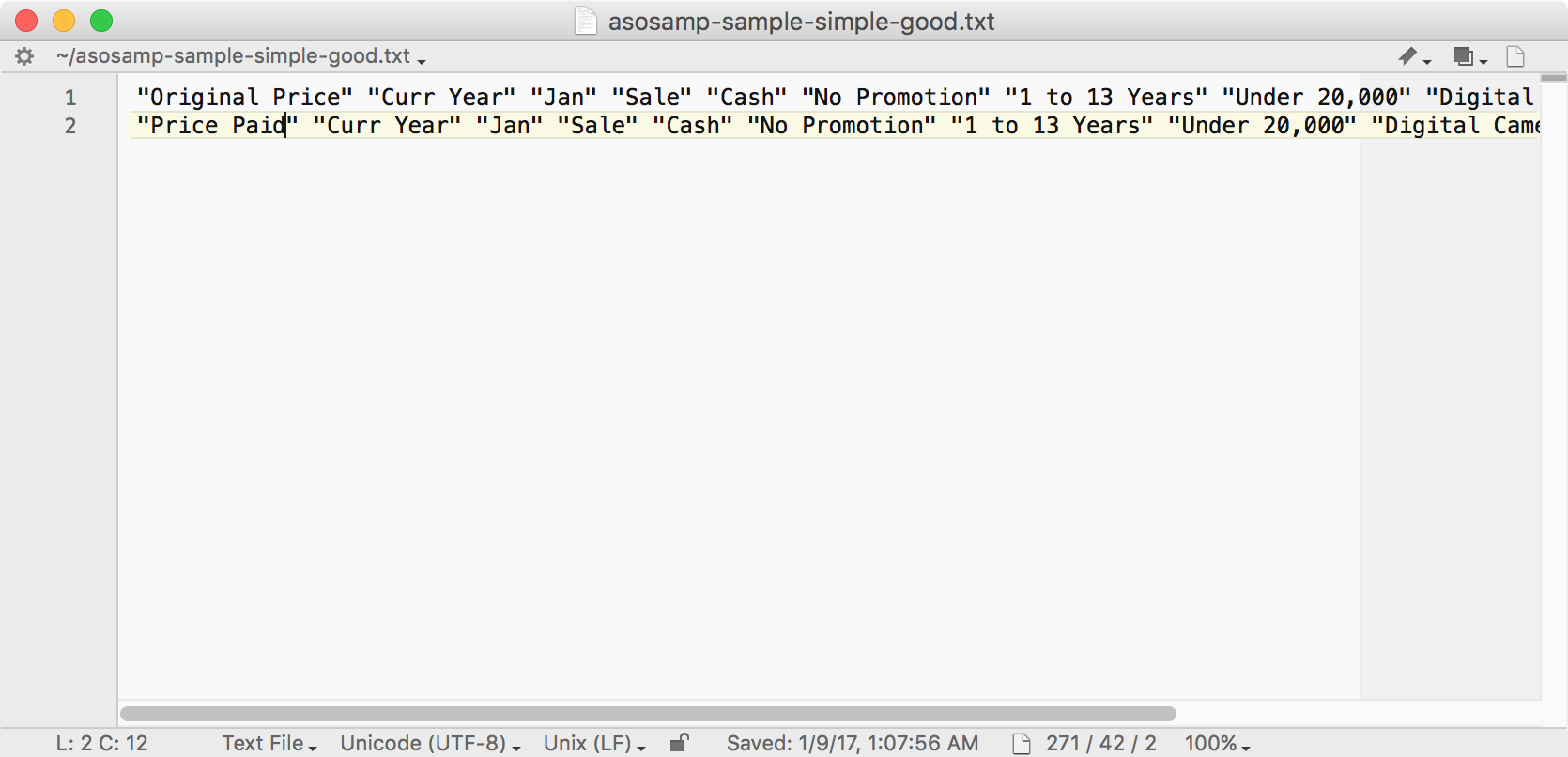
Let’s assume the code works for now. I want to do some testing to make sure that the data loads are working as expected. So here’s an example of a “good” data file (that we expect to load with success):

Example good data for ASOSamp/Sample

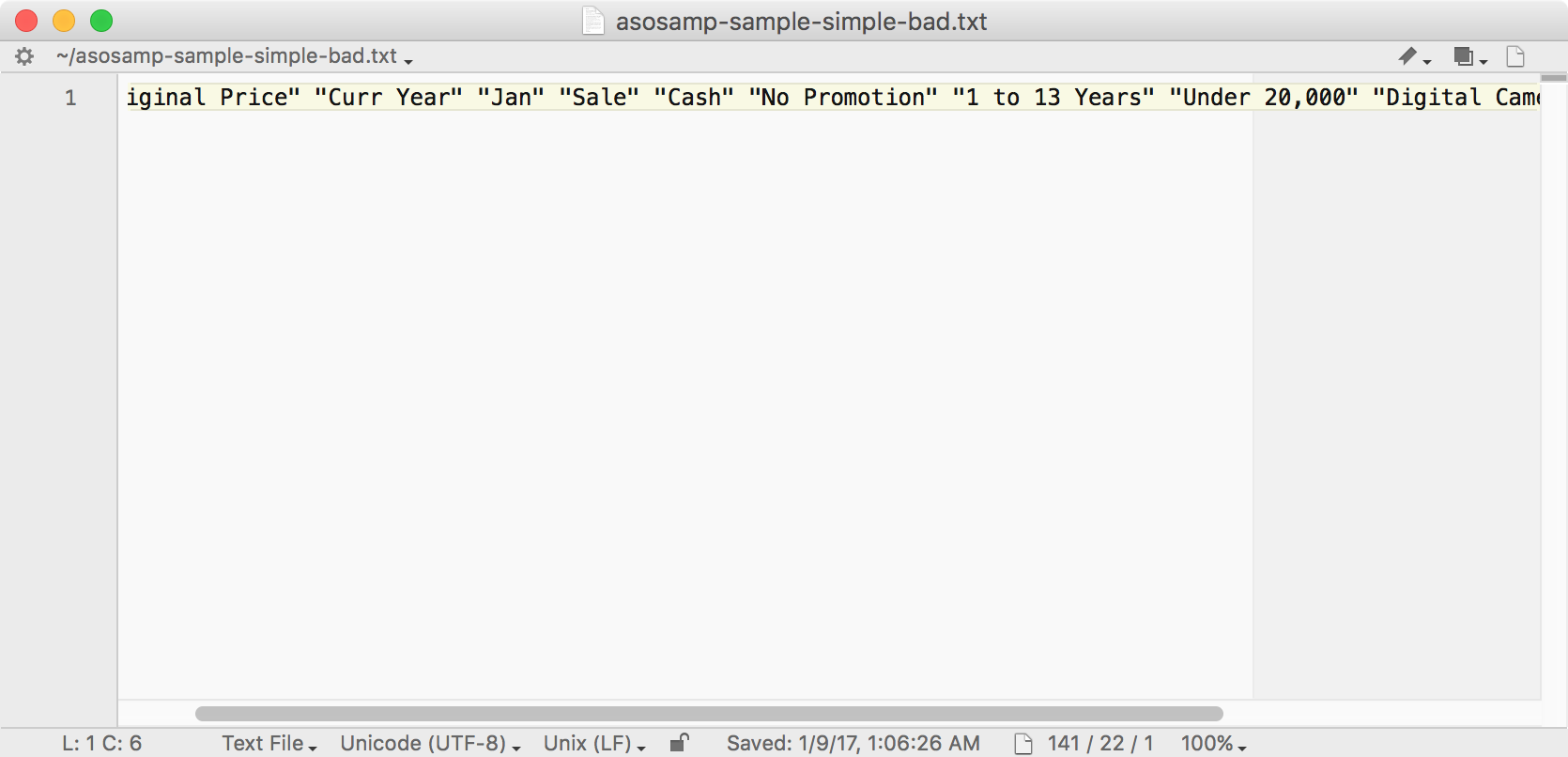
And here’s some bad data:

Example load file with “bad” data

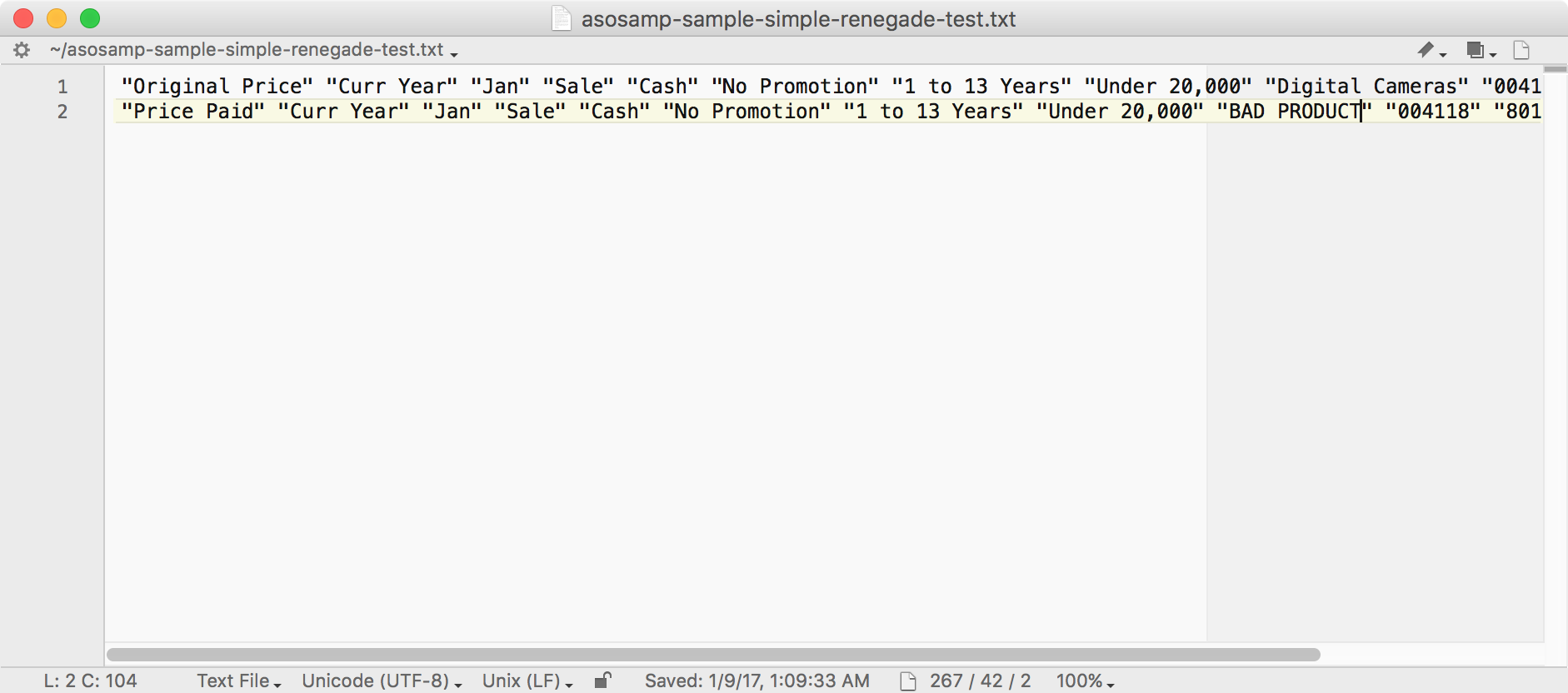
I botched the screenshot a little bit rest assured that I tweaked one of the member names so as to cause a bad load. Lastly, let’s look at an example of good and bad data in one file:

Test of renegade capabilities

Note that there is a bad product named “BAD PRODUCT”. With test files in hand, let’s load the “good” file with a simple load rule:

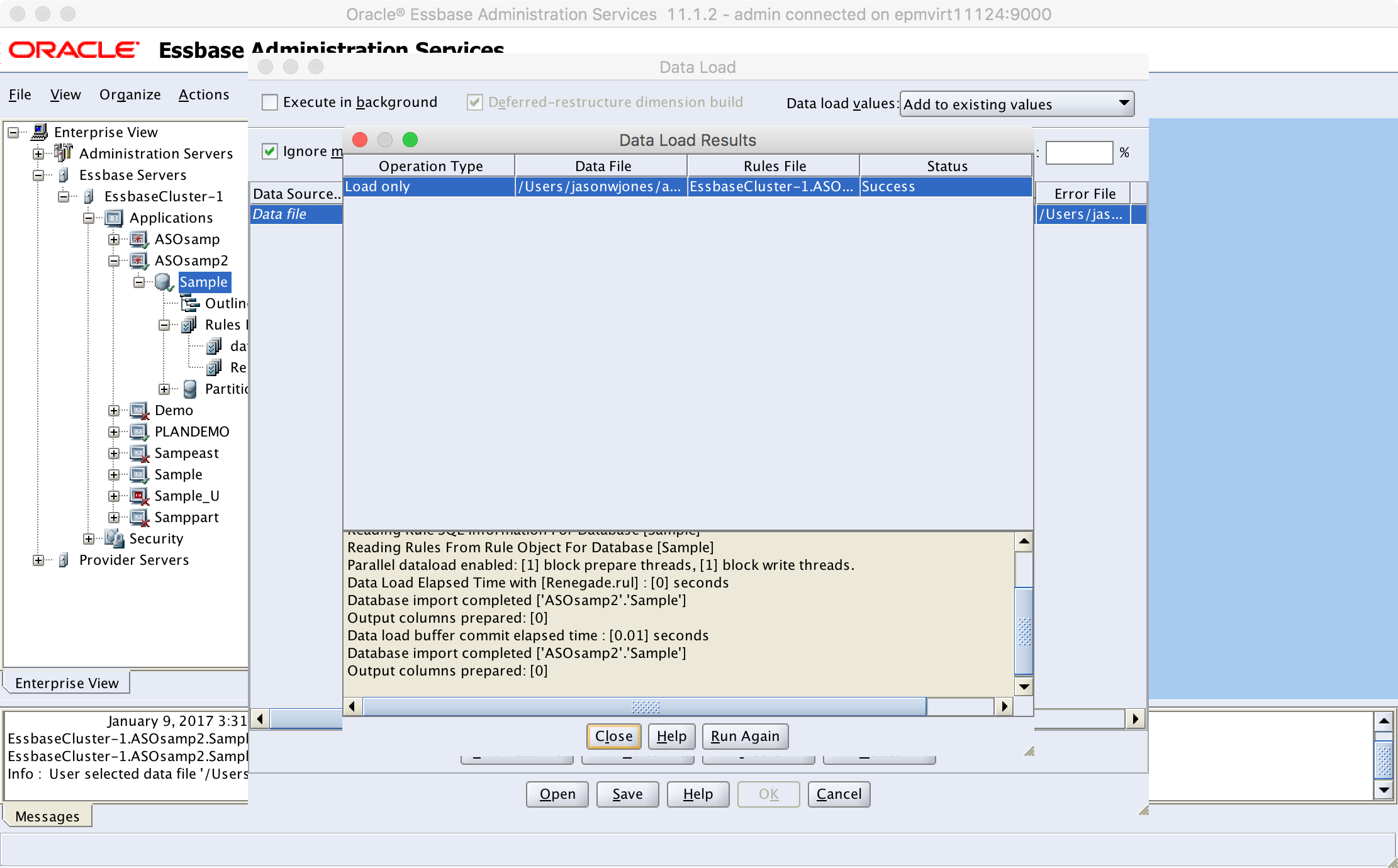
Loading “good” data

Another fun fact: renegade members don’t work when doing free form data loads (i.e., data loads without a load rule), so keep that in mind too. As expected, loading the good at a results in a status of Success. So far so good. How about some bad data:

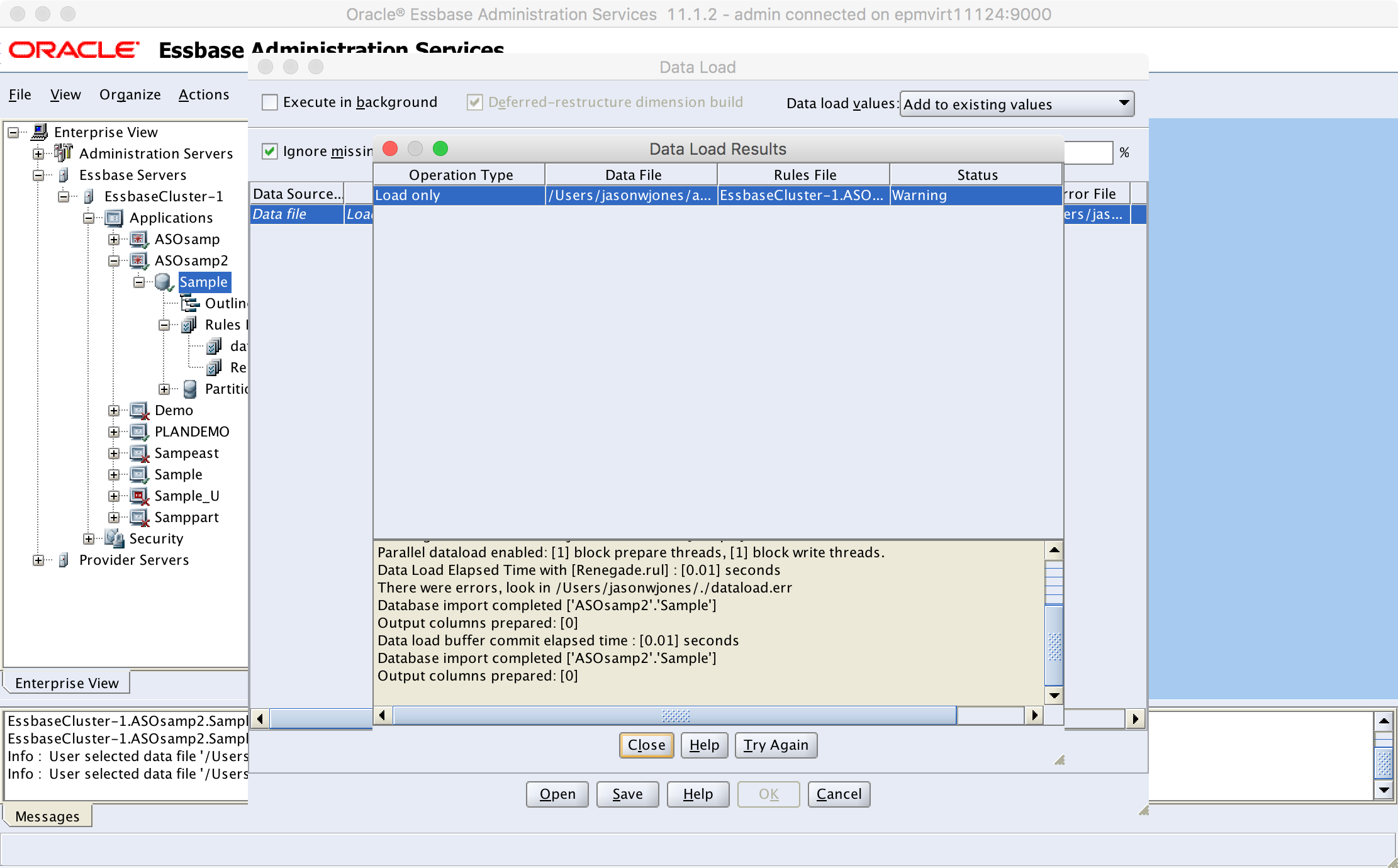
Loading bad data to cube

We get a Warning. Also to be expected. Let’s run the renegade setter program and set the renegade member to a new member we create in the Products dimension, called “Stuff”:

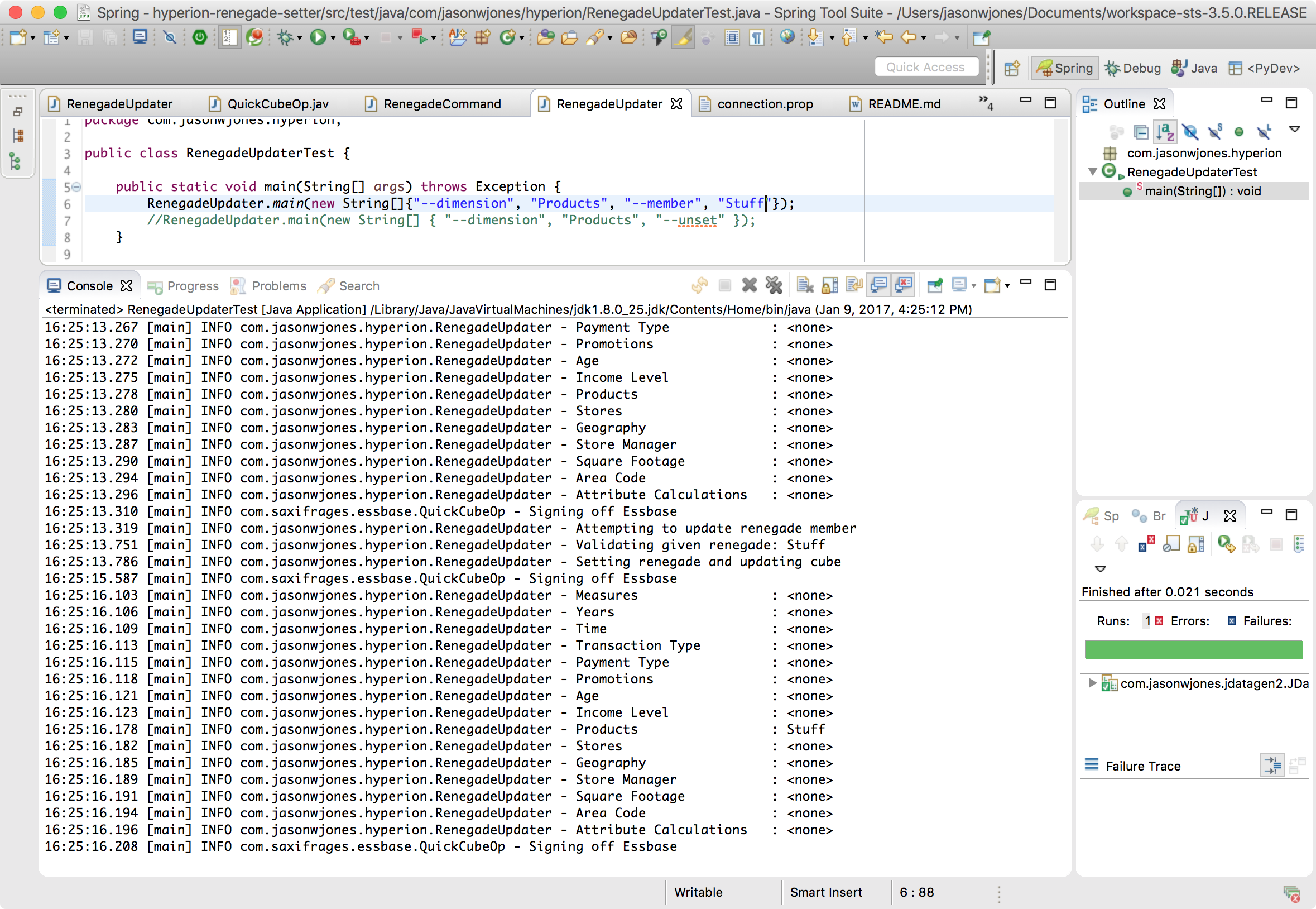
Mapping renegade member for Products

You can see in the latter half of the console output that the member for Products is indeed set to Stuff. Now, before checking out this renegadey goodness, let’s take a look at the database statistics to ensure that the load of the good/bad file truly resulted in just one record (instead of two) loading:

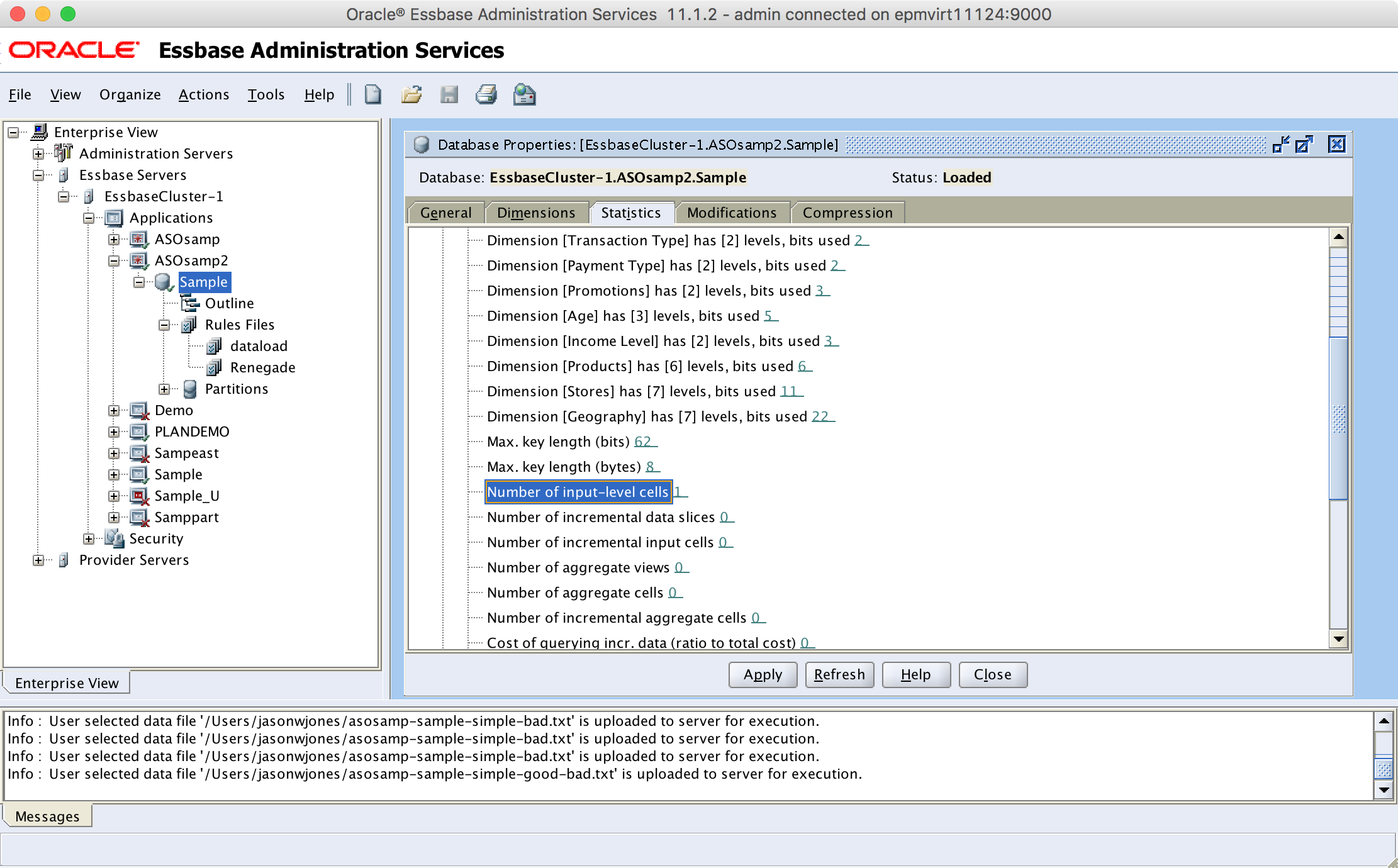
Checking data statistics

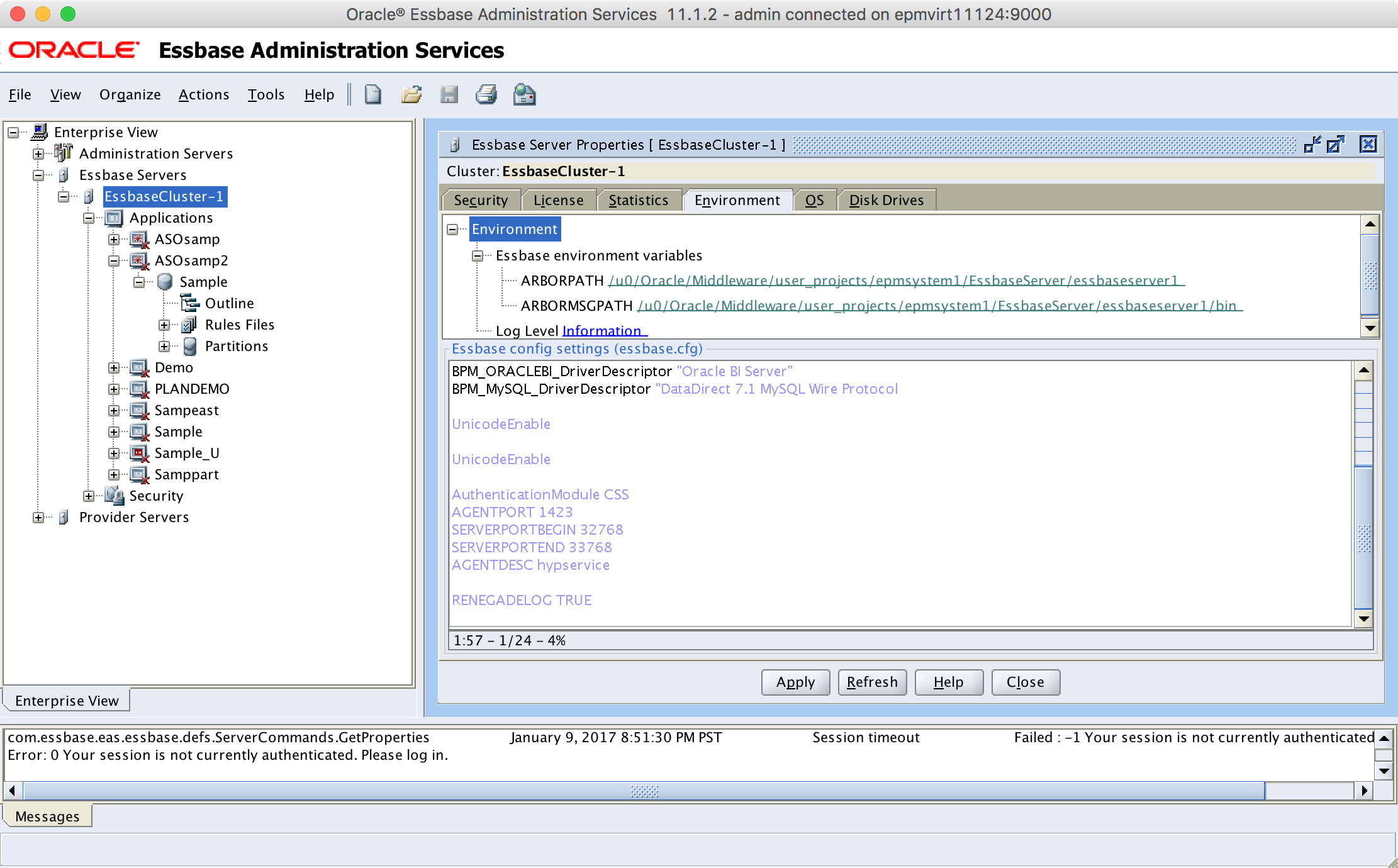
Also, before trying the data load with a renegade member set, let’s turn on RENEGADELOG, which is mentioned in the documentation that exists:

Essbase.cfg setting to log renegade members

Turning this option on tells Essbase (or more specifically, the ASO database in question) to log the results of a renegade load. You don’t have to turn this on but it might be useful.

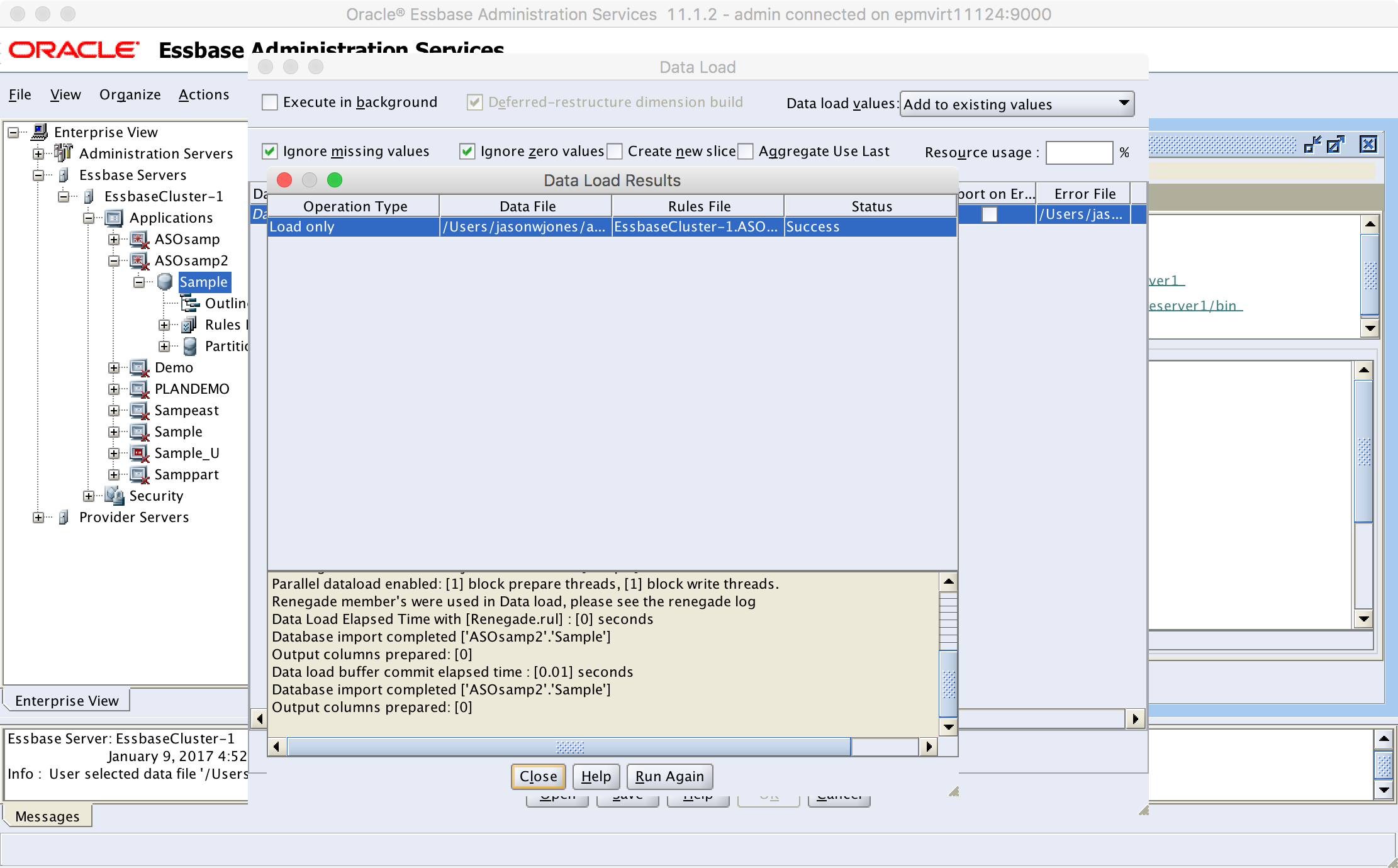
Alright, so we have the renegade member set, we’re doing a data load with a load rule, we’re using an ASO database, and renegade logging is on. Let’s load our data file with the one good and one “bad” record now:

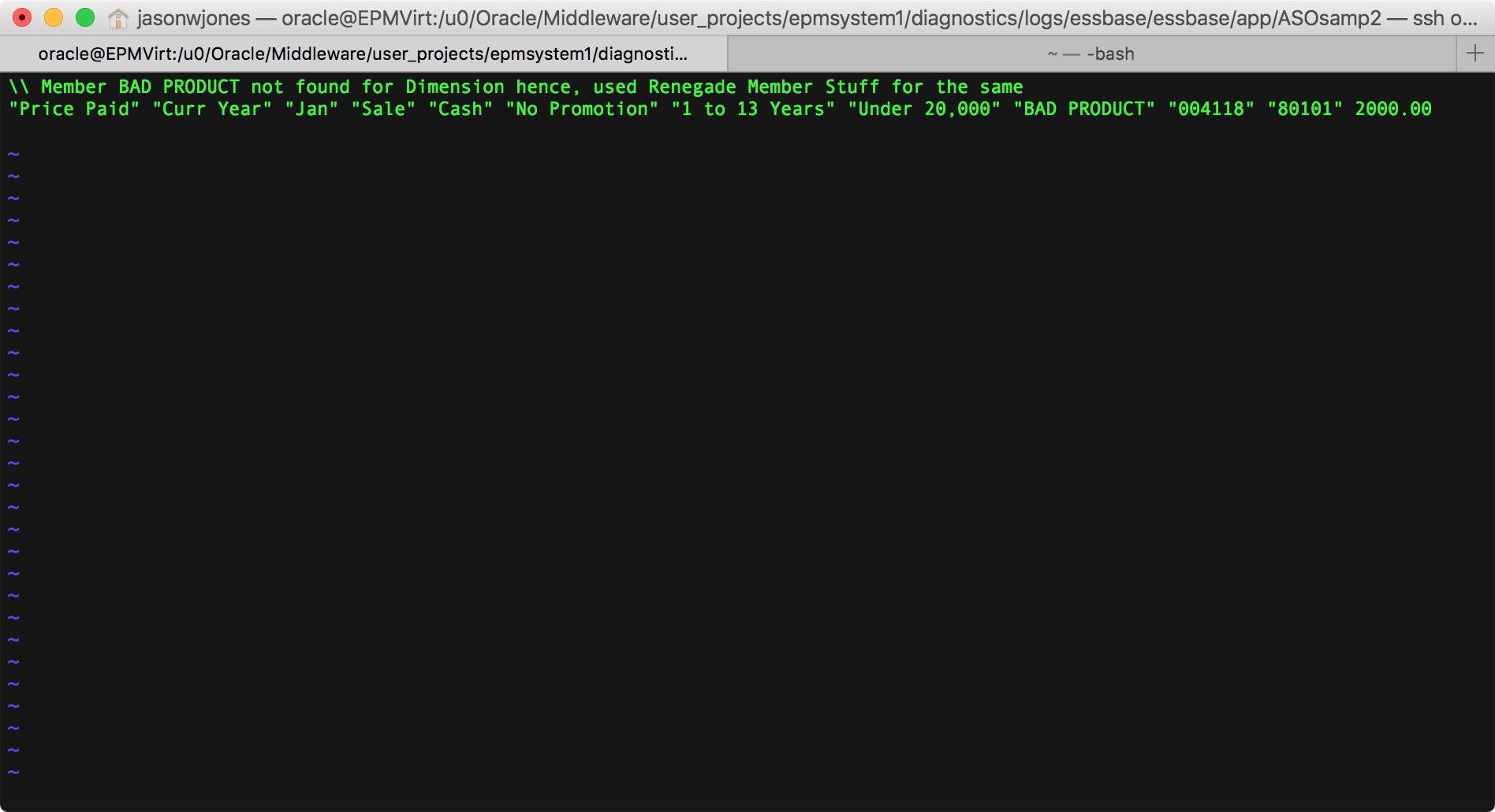
Loading “bad” data after setting the renegade member

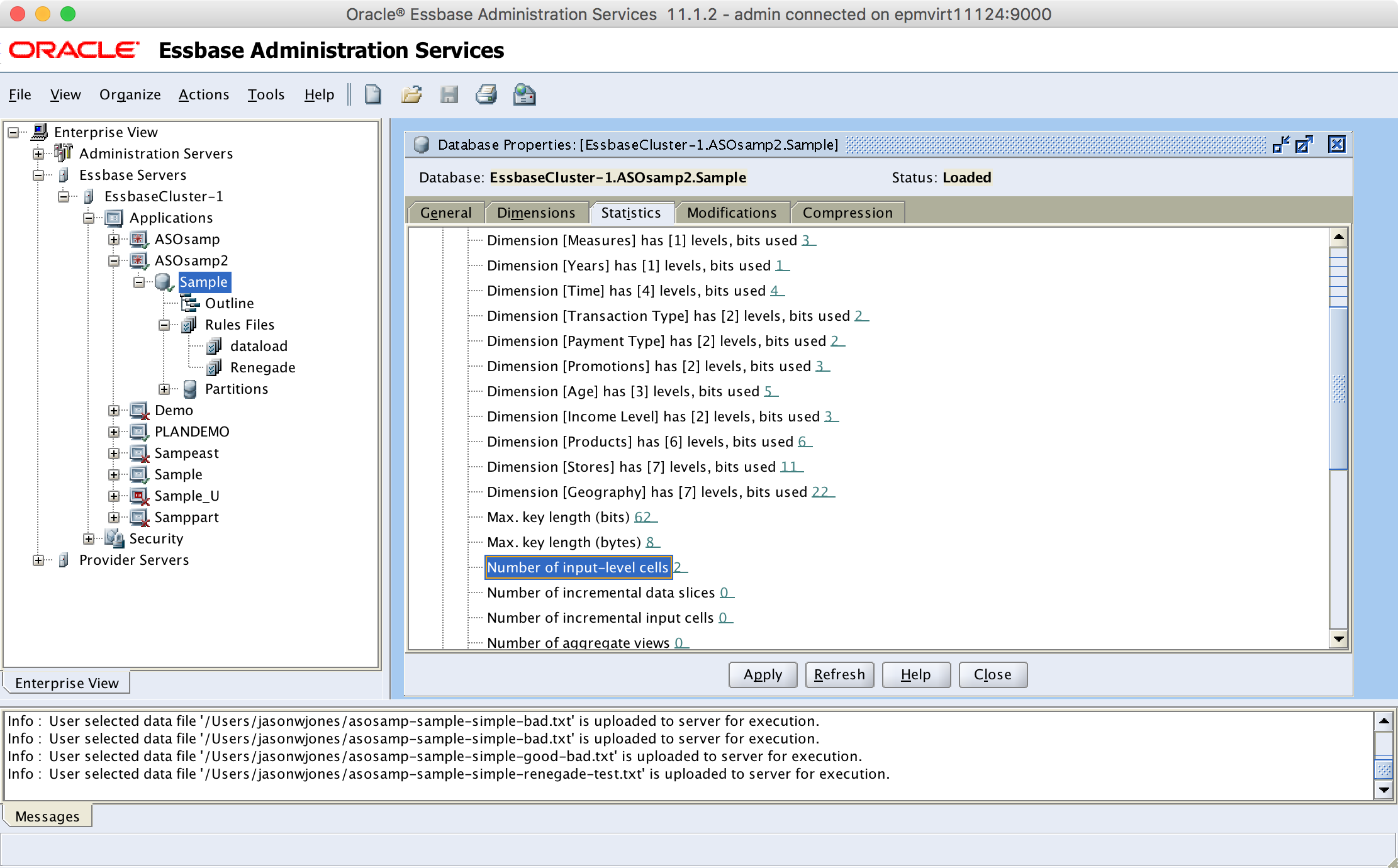
Success! Also note the extra line in the results (“Renegade member’s [sic] were used in Data load, please see the renegade log”). Any, as any good Essbase developer should think: trust but verify. Let’s see how much data is in the cube now:

Checking database statistics

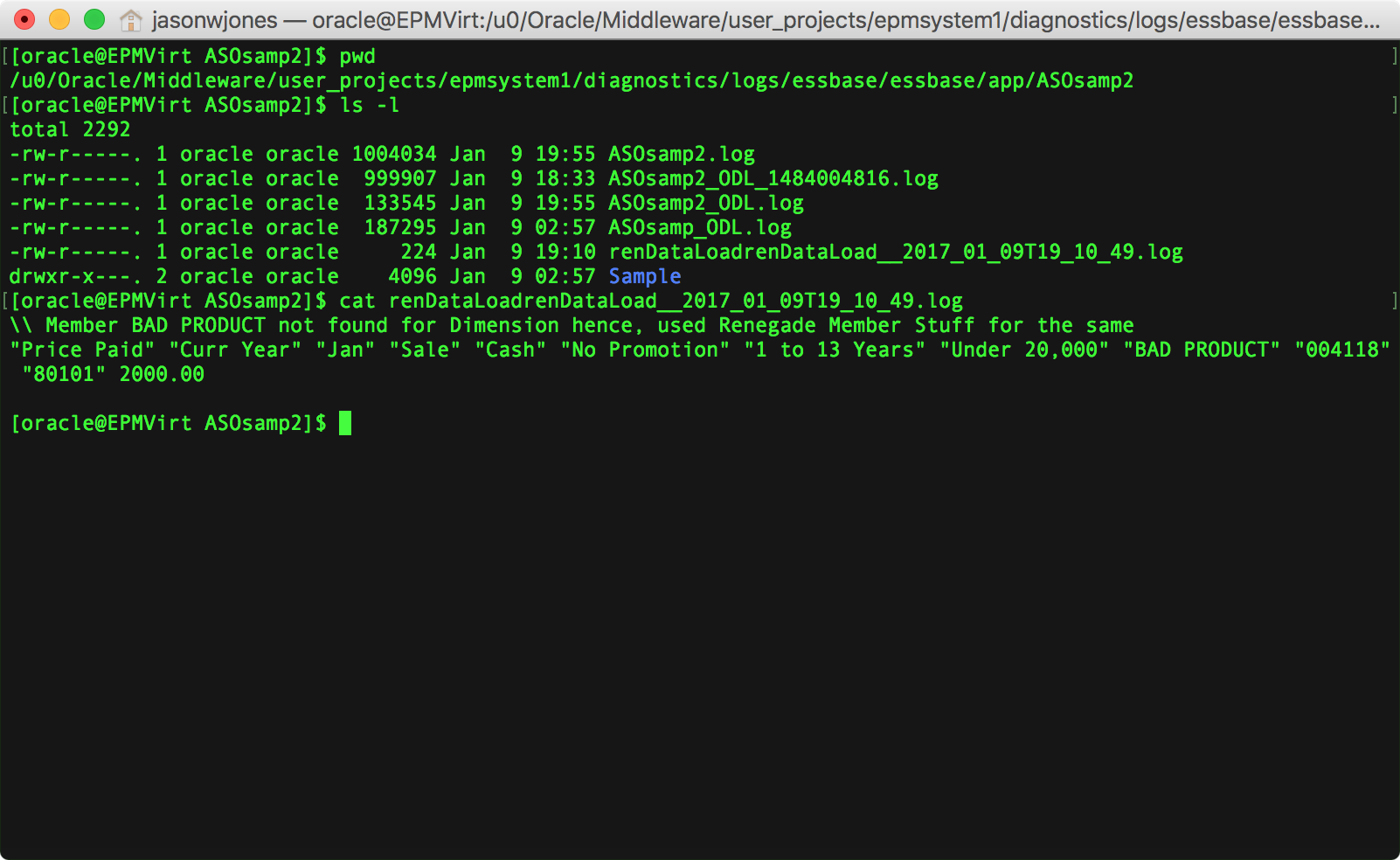
We now have two input cells. Nice. For completeness, let’s go hunt down that renegade data load file inside of the log folder for our cube:

Checking the renegade load log

Here’s the file only:

View of renegade load file

Summary/Thoughts

Renegade members are one of those nice incremental feature ideas that can go into a product. Not revolutionary, but evolutionary. At first blush, it’s a bit curious that this feature only exists in the ASO database type and not BSO (and by extension, hybrid). This makes sense, though. The technical implementation of this feature is highly related to each database technology (more specifically, each database technology’s loading mechanism, be it BSO or ASO) – and we clearly know that BSO and ASO data loads are somewhat different beasts from each other if for no other reason than the fact that ASO cubes have all of this extra functionality around load buffers and whatnot.

So one can imagine that if nothing else, Oracle needed a place to start with in terms of renegade members, and ASO probably makes the most sense. This is for a few reasons. Firstly, renegade members make the most sense in a world where you want to just shovel a bunch of data into a cube and have it add up. ASO is as good of technology as any for this since it doesn’t have dense/sparse considerations, loads fast, and can handle huge gobs of data.

We live in a world where now where there are numerous instances where we are going to be using cubes that are themselves ad hoc, rather than bespoke and incredibly curated (as many/most cubes currently are). So renegade members fits right into this paradigm.

I imagine that there are many dimensions that you wouldn’t want to have renegade members turned on though. They seem like they’d be of curious or even negative value for dimensions like Scenario, Version, Years, and Time, since it’s rare that these dimensions aggregate up. This is going to be more useful for a dimension that aggregates up and you can live with a little fuzziness in the particulars, so long as the top of the house total is correct.

I’ll be curious to see if more enhancements come to the renegade member feature (such as MaxL/GUI support) or if it just remains in the JAPI only (where it is ostensibly leveraged by OBIEE and perhaps the forthcoming EssbaseCS GUI). One imagines that perhaps in the tectonic shift from all things Exalytics to all things Cloud in the last couple of years that renegade members got put on that back burner, as it were.

Even in it’s current, perhaps somewhat less than polished form, I think it has some relevant use cases that would fit nicely for various organizations. A common automation paradigm is to load data to a cube, check for a reject record file, then email it to the admin team. Sometimes the automation is considered to have failed if there are rejected records. So this technique can help reduce the number of cases where automation might fail.

As an interesting aside, several years ago I developed a program (and I know others have as well) that basically takes a rejected records file and remaps the rejects to some known member. This is actually really simple to develop – at least, it’s really simple most of the time. Sometimes there are multiple incorrect members for a single piece of data, and things get a little trickier from there. One of the solutions I developed even checked the account type from the GL and mapped it to a different member (think debit/credit) depending on what type of account it was. Of course, despite my seeming penchant for overengineering automation and one-off Essbase utilities, I actually like things to be as stock as possible. So even in cases where I had developed some specialized automation to help with mapping bad members, I think you could still make a good case for leveraging the built-in renegade member functionality rather than a separate utility.

So, hopefully you found this useful in case like me, you found yourself wondering one day, “Whatever happened to renegade members?”

Dodeca Technique: Multiple Essbase Data Sources in View

When I’m talking about Dodeca features, one that very often comes up is that Dodeca views have great support for multiple data sources. I’ve seen customers and clients use this to give them a cutting edge in terms of developing reports that tie together information from disparate data sources in a flexible way that was previously very cumbersome or impossible with the tools at hand. Among other instances, this feature comes into play when it would be beneficial for a user to view data that happens to reside in multiple databases, but for the sake of the user experience, we don’t want them to have to run multiple reports.

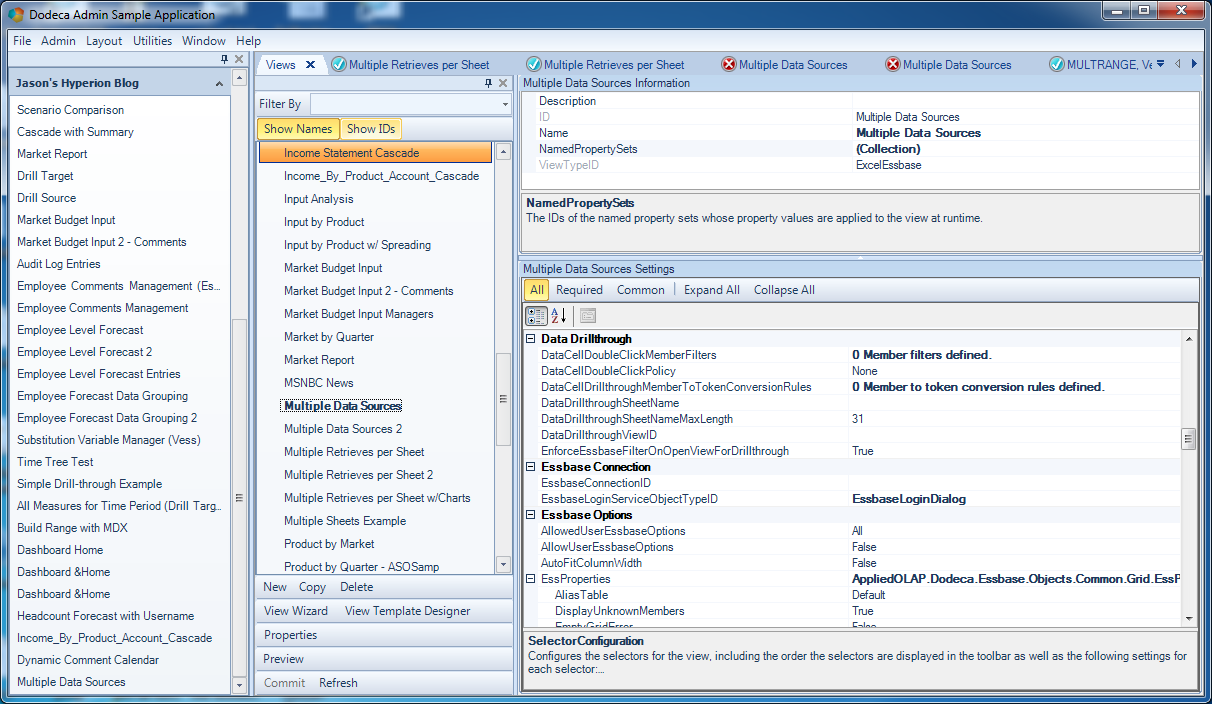
So today I want to look at a very simple Dodeca view that taps into multiple sources. There are a couple of nuances to consider for this development scenario. Consider that a typical view with a single data source will just have its connection specified explicitly as a property on the view, and the selectors on the view (if any) will assume that they are to be populated based on that connection as well. For example, let’s say we have a view based on the Sample/Basic database, and we have two selectors that are dynamically generated: Time and Product. When Dodeca goes to generate the list of Products to display to the user to make their selection(s), it knows to use the Sample/Basic database. However, if we want to have multiple selectors and have their contents be based on a particular cube’s outline, then we need to simply associate the proper connection with the selector.

For today’s example, I’m going to build a simple view that has one tab based on Sample/Basic and another tab based on Demo/Basic (as a brief aside, Demo/Basic is Sample/Basic’s less popular, less-talked about sibling that is eagerly awaiting its day in the spotlight). Note that while this example will have multiple Essbase connections and multiple selectors (one on each database), this isn’t necessarily how a view will always need to be configured. If you have a selector whose contents aren’t dependent on a particular database, then you wouldn’t need to worry about the connection specification for that selector.

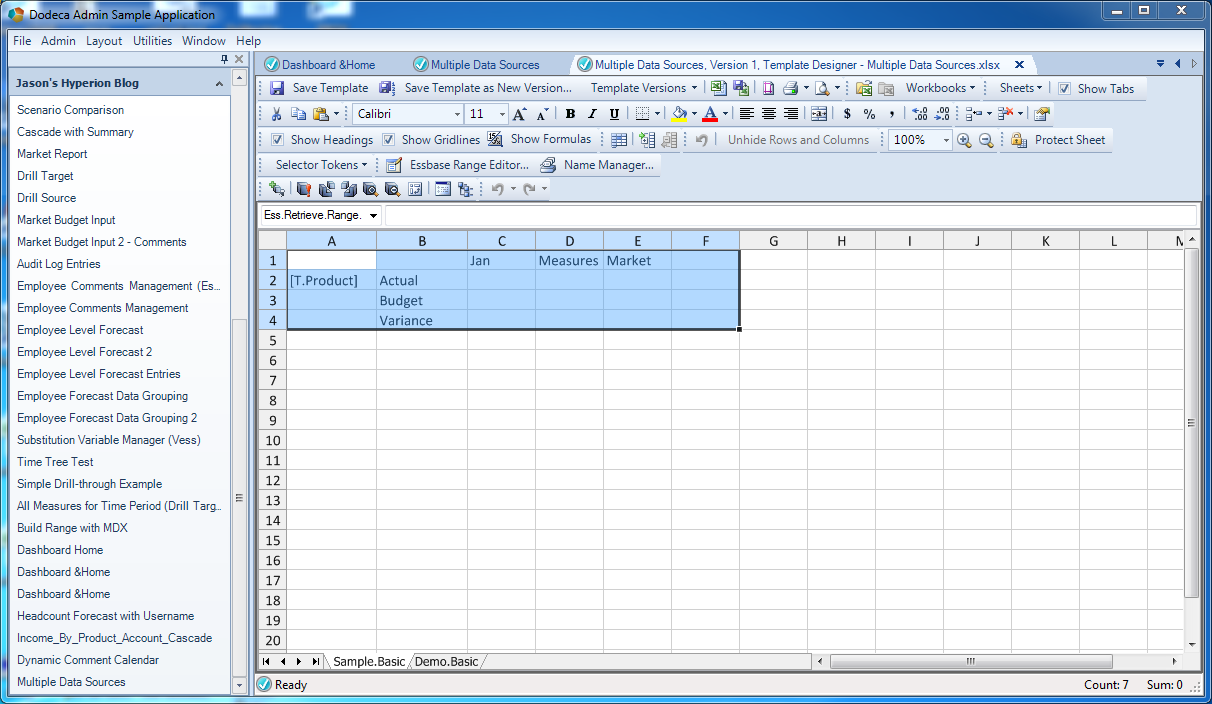
Let’s jump in and configure the view. First of, let’s create a tab that will have a retrieve from Sample/Basic with a single range on it:

Defining retrieve range for data from Sample/Basic

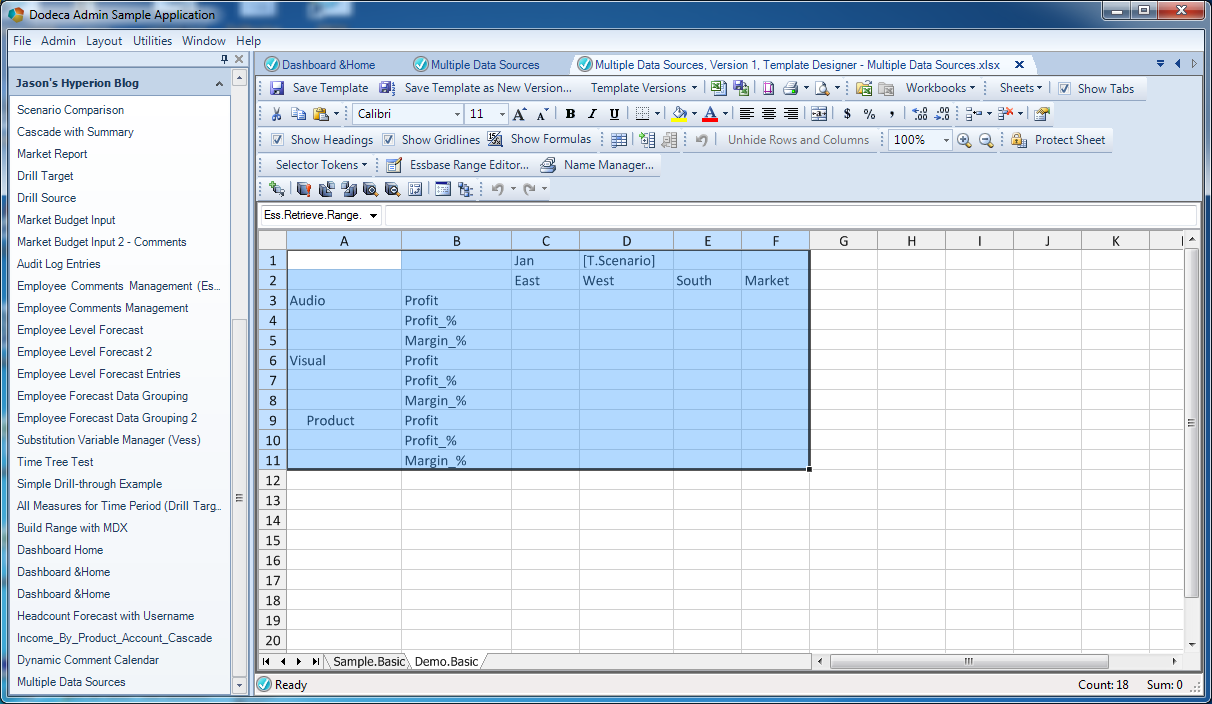
Next, we’ll create another tab that will be based on Demo/Basic and will have a retrieve range based on that database:

Defining retrieve range for data from Demo/Basic

Notice that the Sample/Basic retrieve range contains a selector token [T.Product] and that Demo/Basic contains a selector token [T.Scenario]. The selector lists for these tokens will be generated from their proper respective connections.

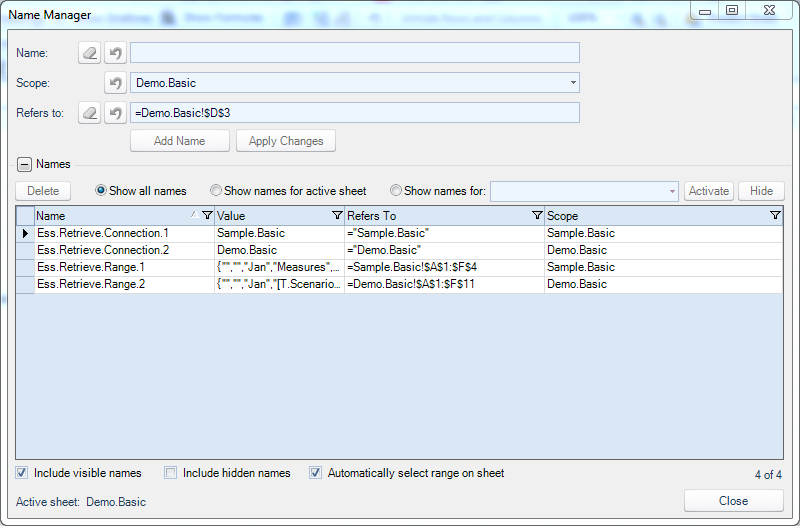
Next, we need to define a couple of special defined names on the sheet so that Dodeca knows which range should be associated with which Essbase connection:

Defining retrieve connection settings

The special names are Ess.Retrieve.Connection.1 and Ess.Retrieve.Connection.2. These are just defined names with a specific value. The name we give them corresponds exactly to an Essbase connection ID defined in Dodeca. The defined retrieve ranges will attempt to use the connection defined in the corresponding retrieve connection definition (e.g., Ess.Retrieve.Range.1 will use Ess.Retrieve.Connection.1).

For this view, rather than defining a specific Essbase connection to use, I’m going to leave that blank (note that EssbaseConnectionID is empty in the following screenshot):

Empty EssbaseConnectionID value

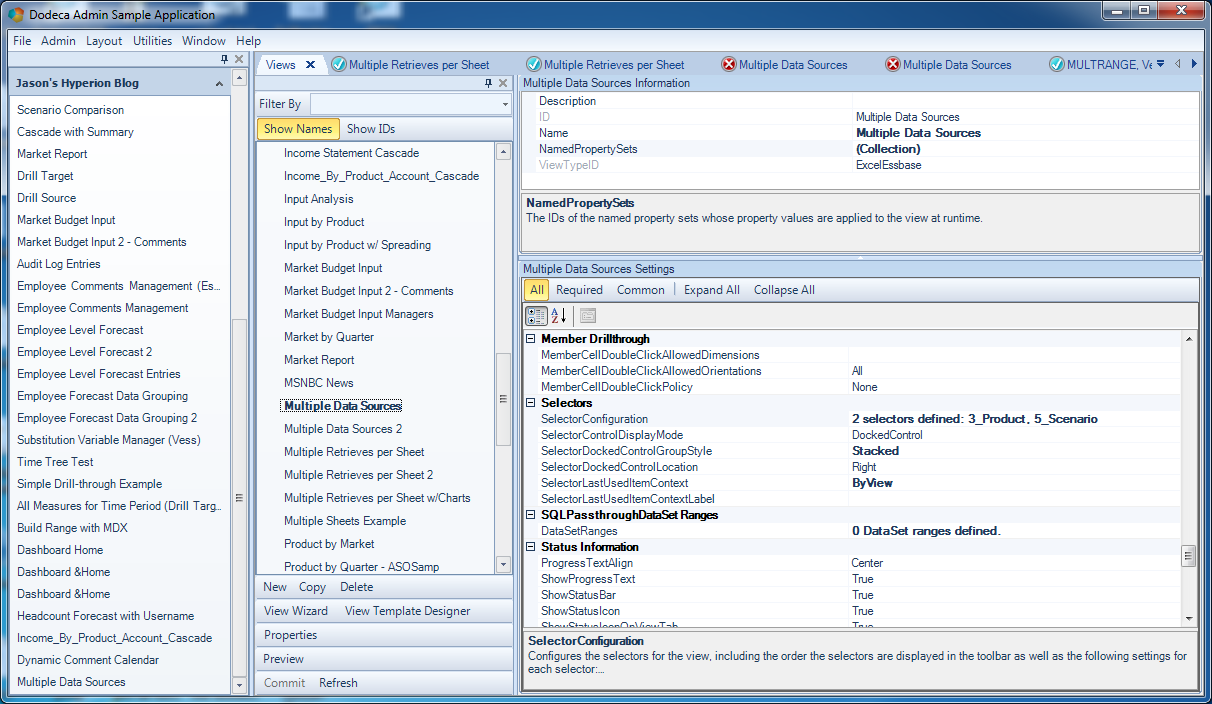
In terms of the selector configuration for the view, I simply have two selectors:

This view has two selectors

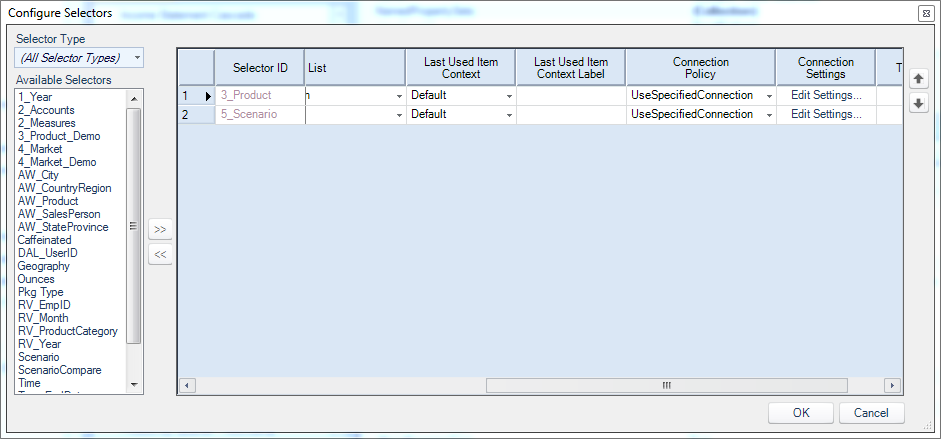
But let’s take a look at the details for the selector configuration:

Selector configuration

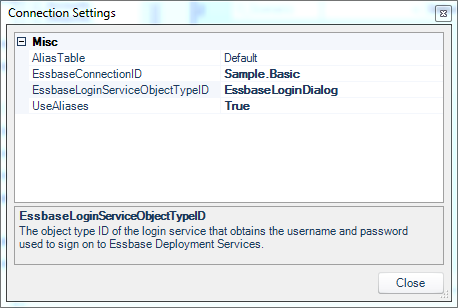
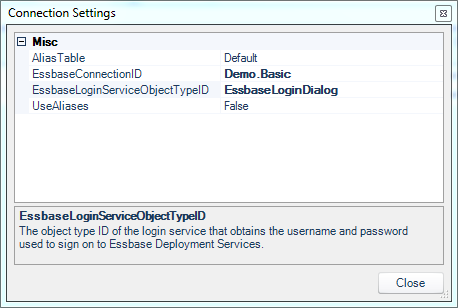
Often the Connection Policy is just UseViewConnection (meaning use the connection defined on the view) but in this case, because we want the selector contents to be dynamic based on a specific connection, we will set this to UseSpecifiedConnection, and then click on Edit Settings… in the Connection Settings configuration to configure the connections:

Connection setting for selector

And for completeness, here’s the configuration for Demo/Basic:

Connection setting for selector

Before we take the plunge and build the view, let’s do a really quick recap: we have an Essbase view with two tabs and two selectors. One tab will be generated based on Sample/Basic, the other from Demo/Basic. Additionally, each tab makes use of a selector whose contents will be dynamically generated based on a particular connection. Usually the connection to use is implicit based on the view configuration, but in this case we need to configure them explicitly.

With all of that configuration out of the way, let’s go ahead and build this thing:

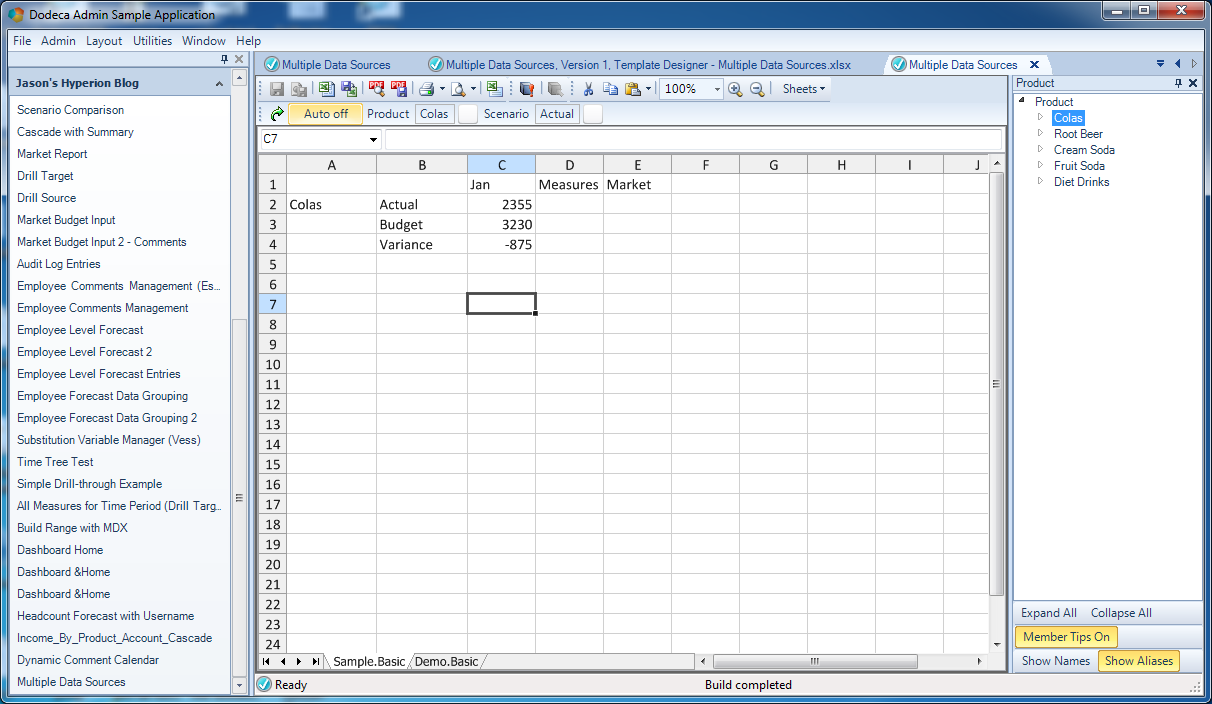
The built view, on the tab with data from Sample/Basic

This looks good: You can see that I have my Product selector with products that are quite obviously populated out of Sample/Basic, my selection (Colas) was plugged in to the view template, and a retrieve was performed. Now let’s go check out the other tab:

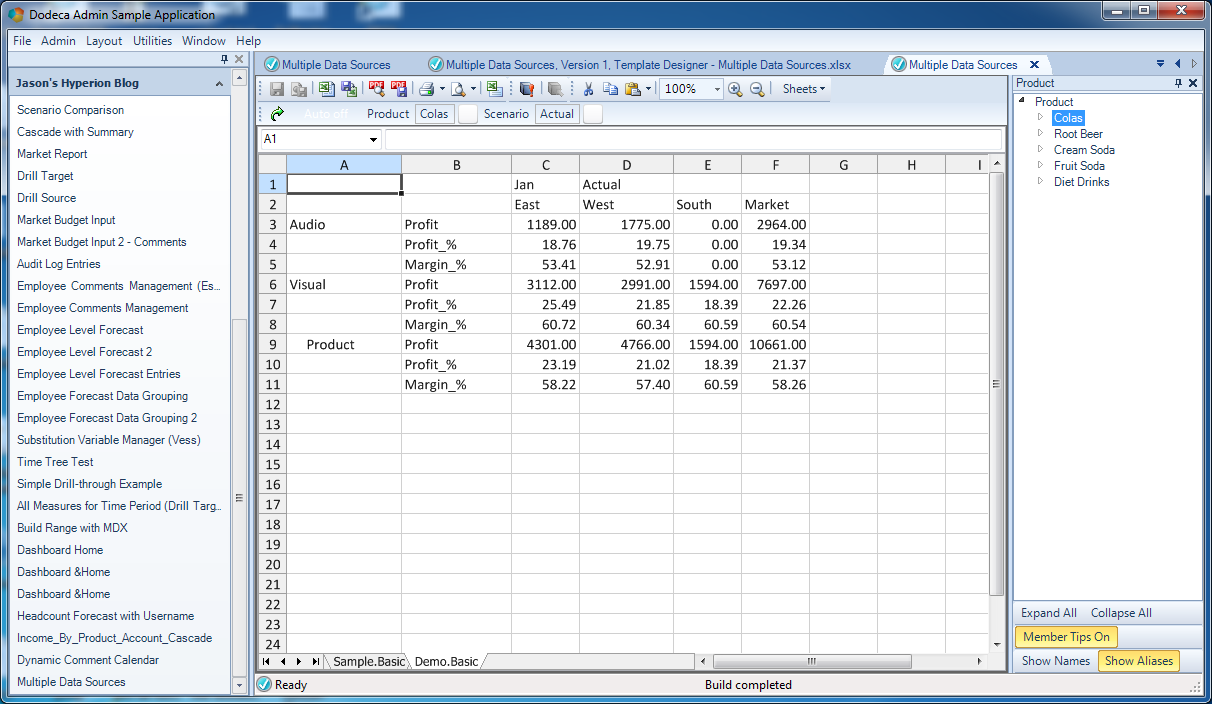
The built view, on the tab with data from Demo/Basic

This also looks good – although in this screenshot I still have the selector from Sample/Basic showing. But you can see that my selected Scenario (Actual) was plugged in and used to retrieve against Demo/Basic. Note the products in column A that are decidedly not of the beverage variety.

That’s a pretty simple and quick overview of using multiple Essbase connections (and multiple selectors with different sources!) in a Dodeca view, but you can start to envision some of the potential applications of this. I have seen some extreme views in Dodeca that have literally hundreds of retrieve ranges and more than a dozen different connections, and the performance is very good. In some cases, being able to build this view in Dodeca (as opposed to manually retrieving and building a report) has resulting in a time savings of days each period, because the Dodeca view builds quickly and automatically.

Top Posts of the Year 2016

Well, 2016 is almost behind us. I haven’t done this before but given that I’ve been doing a fair bit of blogging this year, I wanted to point out the “top posts of the year” on ye olde Jason’s Hyperion Blog. The subjects are diverse (as far as a Hyperion blog goes I suppose) and I think are an interesting reflection of what things people are interested in. Starting with the most popular:

Running MDX queries through a JDBC driver (for fun?): I got a lot of feedback on the MDX over JDBC franken-driver in JDBC. In retrospect, I think this goes to show how rich, diverse, and challenging the world of data integration around Essbase can be. People – developers, consultants, users, whoever – are constantly spending time, energy, and money getting data in and out of their EPM systems. The Thriller MDX-over-JDBC driver hit a real chord with some people that see it as a way to bridge the gap between EPM and other systems.

Drillbridge acquired by Applied OLAP: Probably the biggest news for me this year. Applied OLAP acquired all of Drillbridge (as well as myself) and added it to their portfolio of products, including the Dodeca Spreadsheet Management System, Dodeca Excel Add-In for Essbase, and the Next Generation Outline Extractor. Recently I announced that the enterprise/supported version of Drillbridge was officially named Drillbridge Plus and offers many compelling features, such as upper-level drill support from PBCS.

Kscope16 sessions I’m looking forward to: Interestingly, people were very curious as to what sessions I planned on attending at Kscope16. I’ll be sure to post thoughts on Kscope17 sessions when the time is right. I’ll have a single presentation at Kscope17, which will focus on “demystifying the PBCS REST API”. I hope it’s a crowd-pleaser that people will find useful.

Dependent Selectors in Dodeca: I blogged extensively about Dodeca this year, and apparently this was one the most popular article. Dependent selectors are a great feature in Dodeca that allow for narrowing down or otherwise dynamically generating the selection values for a user. For example, choosing a state could cause another selector to narrow its list of cities to just those in the given state. I’m both surprised and not surprised that this is the most popular Dodeca article. I think it’s cool because this is the type of feature that really enhances the user experience by respecting their time and making a system easier to use.

Data Input with Dodeca, part 1: Dodeca is great for providing a structured way to input data into a cube that is incredibly more robust than “we do lock and sends”. This was the first part in my data input series (six articles!) that covered inputting to Essbase, relational datasources, both at the same time, commentary, and more.

Camshaft MDX tool updated and available: Again with the MDX/data integration theme, people were very curious to find out more about a command-line tool that helps convert MDX queries to useable data files.

Essbasepy updated for Python 3: Surprisingly (to me), people the article on the Essbasepy library caught a lot of people’s attention. A lot of people are using Python to do integration/automation, and Essbase is definitely a part of the picture.

TBC Files for Bankruptcy: My tongue-in-cheek look at the woeful situation at everyone’s favorite beverage company!

Drillable Columns in Drillbridge: Lastly (but not least), one of my favorite features in Drillbridge and I think one of the standout features that you get when it comes to drilling into a web browser instead of a tab in your workbook: the ability to drill from a drill. With drillable columns, you can specify a subsequent view to drill to and the POV of the row (the global POV plus the key/values from that row) will be used to execute it. Many organizations are using this to drill into further/related journal detail, PDF files of invoices, and more. It’s a great feature!

Well, that’s the highlights from 2016. I’ll be looking forward to another productive blogging year with all sorts of exciting things regarding Dodeca, Drillbridge, the Next Generation Outline Extractor, Kscope17, and even a few secret projects I have been working on. Happy new year!


Guest Posts Welcome

I’ve talked with a fair number of you lately about various Oracle/Essbase/Hyperion topics and there are a lot of you out there with great ideas, news, or things to talk about but you don’t have your own blog. I just wanted to reiterate that if you want to write about something and get it out to folks, I’m happy to post it here. Just reach out to me and we’ll figure it out!

Drillbridge Update: Officially Announcing Drillbridge Plus

It has been awhile since an official post on Drillbridge, so today I am happy to say that there has been a lot going on with Drillbridge behind the scenes!

For those of you not familiar, Drillbridge is an innovative software application that runs as a service and makes it very easy to implement drill-through on Essbase cubes from Smart View, Hyperion Planning (including PBCS, including drilling from upper level members!), and Hyperion Financial Reporting. It accomplishes this by offering a robust and flexible way to translate a given cell’s point of view into a SQL query that it then executes and presents to the user. I have blogged about it extensively and presented on it at multiple conferences. In fact, during both of my Kscope presentations on Drillbridge I did a live demo starting with literally nothing but an Essbase server and relational table and then proceeded to download the zip file containing Drillbridge, install it, configure it, and use it to perform an actual drill-through request from Smart View in less than 15 minutes.

Over the past few years, Drillbridge has been a really great solution for many companies because it’s non-invasive (keep your existing cube and automation), flexible (drill to bottom, drill between columns, automatic hyperlinks, formatting, and more), offers an “insanely fast development time”, and works with most relational database technologies. The number of companies that have installed and deployed Drillbridge is absolutely staggering to me. I get emails almost every week from people about how easy it is to use. Many of the emails mention that they downloaded Drillbridge earlier in the day and go it working in a very short period of time. I never get tired of hearing that.

Versions:  Drillbridge Community Edition & Drillbridge Plus

Drillbridge started off life as a totally free piece of software, and to this day there it is still available in a free form. This edition is now called Drillbridge Community Edition and it can be downloaded from the Applied OLAP website. Later on, a licensed version of Drillbridge was offered for companies that wanted additional features, and usually more importantly, came with official software support/maintenance. This version was called Drillbridge Enterprise; this version has been renamed to Drillbridge Plus. Besides being officially supported by Applied OLAP, Drillbridge Plus has numerous features that the free version doesn’t have. This includes advanced paging/caching options, automation integration, PBCS support, custom plugins, and more. It’s a really great piece of software with some really powerful capabilities.

Future of Drillbridge

Drillbridge has an exciting roadmap (that I’m looking forward to blogging about more in the future) along with its sibling software applications at Applied OLAP, including the Dodeca Spreadsheet Management System, Dodeca Excel Add-In for Essbase, and the venerable, completely free Essbase Outline Extractor. We are dedicated to making Essbase (and the lives of people in the greater Essbase community) better. Please do not hesitate to contact us for additional information.