jason's hyperion blog

essbase from the trenches

Drillbridge, the simple way to implement drill through

I implemented a drill through solution for a company earlier this year. We used a combination of Essbase Studio and ODI. I always felt right at home with Essbase Integration Services (EIS) but hadn’t played too terribly much with Studio – until now.

The solution came out working beautifully. Along the way, however, my research into the solution options led me down some interesting paths. In particular is that Essbase has supported drill-through definitions on cubes for quite some time. In practice this means you can define intersections on the cube that should be drillable, and then provide a URL to drill to. Generally this will be some Oracle software but the door is open to drill to anything – provided you can implement the backend properly.

What started out as a proof of concept has evolved into software that I am calling Drillbridge. Drillbridge is a turnkey solution for implementing drillthrough to a relational database. All you need is the following:

  1. An Essbase cube
  2. A relational database with data you want to drill through to that can be mapped somehow from the source data
  3. SmartView (sorry Excel add-in users)

I should add a little bit more about that second point: if the member in your cube is Jan or January but you have a table somewhere that has a field with a value of ’01’ or similar, then you need to construct a view/query that can map from one to the other somehow. Similarly, if you prefix your Account members with A or A_ or something, then you just need to construct the query to transform the data accordingly. In practice I am finding that this isn’t too hard.

Drillbridge works out of the box with Microsoft SQL Server, Oracle, and MySQL, with potential support for pretty much anything that JDBC can connect to (hint: that’s almost anything on the planet).

I’ll have some more info in the coming weeks but for now I threw together a pretty quick video showing the basic Drillbridge admin interface and a working demo from the venerable Sample/Basic database.

SeaHUG officially off and running

Hi all, the Seattle Hyperion User Group is officially up and running! More details to come but right now we are rounding up all the various Seattle and Greater Seattle Hyperion folks from all of the various nooks and crannies. Since not EVERYONE reads this blog (but should), if you are in Seattle or have some colleagues in Seattle that might be interested, will you please let them know about SeaHUG?

Calling all Seattle-based Hyperion enthusiasts!

Are you in the Seattle or greater Seattle region? Are you a Hyperion, Essbase, EPM, OLAP, BI, or whatever-you-want-to-call-it enthusiast? There is a new Hyperion User Group starting up that I am helping out with. We would love your feedback to see what kind of meetups and content YOU, the user, would be most interested in. If you’re in this area (or even a little further to the south in Oregon!) can you please take a few minutes to fill out a quick survey?

Thanks for your time!

Gadget Review: The Jiggler

So, theoretically speaking, let’s say you are doing some work for a client and they give you one of their laptops. Said client is super secure and employs all of the latest and greatest tricks and tips to minimize their risk. And one of those security techniques is to auto lock the laptop after a certain number of minutes of no input. And this setting can’t be changed (because that’s locked down too). And you are working between that laptop and another laptop (say, a nice MacBook Pro…). What to do? Well, hypothetically speaking, you could plugin a little device to pretend your mouse is jiggling. In fact, it might even be called the Jiggler. Yeah, this might do the trick… just saying.

OAUG Collaborate 2014 is a wrap

I went to my first OAUG Collaborate last week. To date I have almost entirely been a Kscope person. Kscope definitely has a much larger Hyperion presence/footprint, but there’s a little bit of Hyperion at Collaborate. Nicely enough, my favorite Hyperion consulting firm had a booth on the main floor.

I was at Collaborate in a mostly non-Hyperion capacity, however. I gave my presentation on Oracle Data Integrator that is a case study/success story of refactoring a lot of boilerplate, hard-to-maintain, and buggy code into clean ODI packages. I expanded the presentation from when I gave it at NWOUG last year. It now includes a screenshot of ODI Studio for each piece of ODI functionality I talk about, then towards the end I have broken down a SQL to SQL Oracle interface with journalization so we can see exactly how ODI accomplishes this particular job in such an awesome way. It’s a bit of a deep dive but when the audience is full of SQL experts I think it makes sense. The presentation clocks in at almost exactly an hour now so I think I’m going to find some ways to trim it and polish it a little bit.

With Collaborate under my belt, this now makes the list of unique conferences I have presented at three items long: Kscope, NWOUG, and Collaborate. Not too shabby.

Thanks to all those that attended – there were many more people that I possibly would have thought (although I suspect few if any of you read this blog… :)

A quick trick to avoid hard-coding folder names in batch files

I’m still surprised (although I guess I shouldn’t be) how often I come across batch automation files that have a first line of setting the current folder – using a hard-coded folder name. For example, if the automation is located in D:\Essbase\Automation, then the first line of the script looks like this:

cd /d D:\Essbase\Automation

99% of the time, this line is the same as the folder containing the batch file. Instead of hard-coding this, you can actually just use a handy shortcut on Windows:

cd /d %~dp0

The %~dp0 token/variable gets replaced at runtime with the current folder containing the executing file. The /d parameter simply tells the cd command to change drives, if necessary (so that the change directory command works if it’s going from the C drive to the D drive, for example).

Using the above technique, you can write batch files that are more standard looking, portable, and more flexible. It’s a good thing (said in the voice of Martha Stewart).

Winter Update

It has been a busy fourth quarter, to put it mildly. As luck would have it, I have found myself on this Saturday with a few minutes on my hands and thought I would do a quick post.

I’m doing a lot of work in ODI, Essbase automation, and some fun things involving the intersection of mobile, the cloud, and Essbase. So it’s exciting times as always. Earlier in November I did a presentation in Portland at NWOUG (Northwest Oracle User Group) on an ODI success story. I’ll also be giving that presentation in Las Vegas next year for OAUG, and just to get even more mileage out of it I will be presenting it at next year’s Kscope, by ODTUG. Man, I am getting some serious mileage out of this thing. I keep refining it and making it a little bit better each time. The way it’s currently structured, it’s more of a business-friendly approach why ODI is so awesome, but I’d like to make it more technical, so by the time Kscope rolls around I will have hopefully morphed it into a nice blend of high-level and low-level information.

Speaking of Kscope, another abstract of mine was accepted. It’s ostensibly my Practical Essbase Web Services presentation from last year, but refined a bit. The number one feedback I got from last year’s presentation was that a live demo would have been good. Well, you asked and you shall receive. Next year’s presentation will have a live demo (probably on a local VM but I may have a few other tricks up my sleeve).

That’s kind of what I’ve been up to. Oh, and along the way in my spare time I accidentally created an ad hoc app on the iPad for Essbase. So, there’s that too.

Two of my favorite things together at last: Essbase and reddit

Just quick post today to turn your attention to the new Essbase reddit. For those of you unfamiliar, reddit is a community site for posting and discussing cool, interesting, or whatever links. I’ve had this up for a little while now and have been slowly putting in some links as time allows. A couple of you have stumbled on to it already.

I thought this might be a cool way for us Hyperion bloggers/followers/enthusiasts out new content, discuss Essbase/EPM news, and post relevant links. This is my first time moderating/managing a reddit community. If you want to help out and/or be a moderator, please message me and we can figure it out.

The idea here is not to try and suck away traffic from the technical discussion forums such as OTN and Network 54, but rather to to complement them and our blogs by having a general area for discussion along the lines of “hey, check this out!” and “I wonder what other people have posted?”

For the least part, I’ll try and post something interesting on a regular (if not incredibly frequent basis by reddit standards) to keep things fresh and exciting!

Please enjoy and if you have a cool link to share, send it to /r/essbase!

Friday fun day, fish names, and 100th post!

Happy Friday! Most of you Hyperion folks out there have probably called it a week already, so you can just catch the fun from your RSS readers or when you come up for air next week. It has been a busy week on my end, what with doing a fairly deep cubeSavvy review, building elegant/robust/awesome solutions for clients, polishing up open source Essbase power tools, and more (even a few things I can’t mention… yet).

A while back I mused on some Essbase or Hyperion related names for my new betta fish. I never circled back to this but I have to go with a late submission from “Keith” – so without further ado, Mr. Fish will be henceforth known as DBAG. *hehe*

Last, but not least, this is my one-hundredth blog post here. Wow! I’d probably write anyway even if no one read this blog because I find it oddly therapeutic (not to mention serving as a repository for the obscure bugs I track down and fix), but to those of you that regularly comment, email me, offer to help out on testing some tool, and say Hello at conferences, thank you very much for your time and thoughtfulness.

Have a great weekend.

cubeSavvy Review

One of my personal blogging goals this year is to take a tour of apps, code, libraries, and other third-party tools in the Hyperion ecosystem. I have some cool stuff on deck to be reviewed, starting with today.

Today I’d like to take a look at Harry GatescubeSavvy. cubeSavvy ostensibly purports to be “Planning without Planning”. Or, put another way, it’s a web-based interface for Essbase cubes, without all of the additional infrastructure and setup that Planning entails. This is an interesting approach. Let’s think about it for a moment.

As many of you know, by design, Hyperion Planning sits on top of Essbase and is synchronized down to Essbase. This design has some drawbacks and some advantages that are possibly worth musing on in a future post. Planning also brings a lot of extra functionality to the table that manifests itself in the user interface and/or is pushed down in some way to the underlying cube. cubeSavvy comes to the table and more or less says, “Hey, let’s do away with all of that and get a little more purist about this: let’s have grids (similar in concept to forms in Planning) defined that work with our vanilla Essbase functionality – and let’s just manage the cube instead of pushing and synchronizing things down to Essbase.”

So in theory, if you have an Essbase server up and running and then stick a cubeSavvy server in front of it, define some grids and provision some users, you’ve got a web-based budgeting and planning system on top of your cubes. Interesting.

In a first for me and this blog, this article will be split up in to several pages, covering Installation & Setup, Configuring Grids, User Experience, and Closing Thoughts. Please enjoy this whirlwind tour of cubeSavvy!

Installation & Setup

cubeSavvy has a pretty straightforward setup process. It doesn’t require setting up an configuring a separate relational database, which can greatly simplify and speed things up (at least in terms of deployment). This might sound a bit odd (not having a relational database) but I’m quite familiar with the concept and coming from the Java world myself (which cubeSavvy’s server component is written in), I know that there are some very capable relational databases that are written entirely in Java that are up to the task of storing persistent cubeSavvy info.

cubeSavvy is a Java servlet that comes with its own servlet container (think Tomcat, WebLogic, etc.), database, and installer. As Java software, these components are all cross-platform (or at least ostensibly cross-platform). My main machine is a Mac (a maxed out early-2011 i7 MacBook Pro), and I figured, hey, why not see if this baby runs on a Mac? Aren’t we all a little tired of enterprise software running on Windows and Linux? Let’s let the Mac have some fun!

cubeSavvy just needs a few things configured to get up and running: the target server, APS URL, and the EPM version (I tested this with EPM 11.1.2.3 that is installed on Windows Server 2008 R2 64-bit). Here’s one of the installer screens:
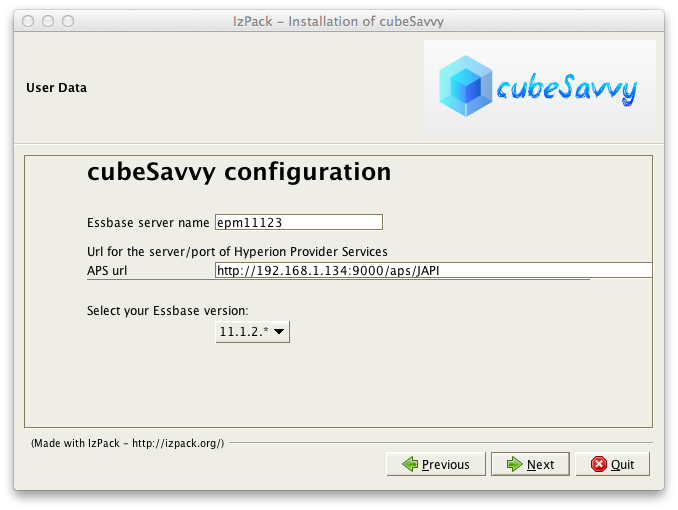
cubeSavvy config/install

cubeSavvy config/install

After copying some files around and installing things, cubeSavvy presents us this screen:
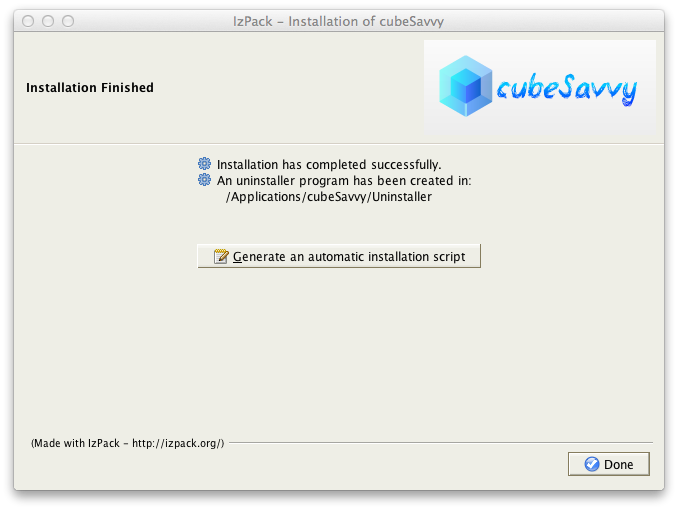
cubeSavvy installation finish

cubeSavvy installation finish

And things are installed. We now just start up the service and we’re able to get to it with a standard browser. As an aside, cubeSavvy quite obviously uses what is called “Twitter Bootstrap”. For those of you not familiar, Twitter Bootstrap is a something of a foundational layer of HTML and CSS for web developers that generally looks pretty good and has been extensively tested to work in all browsers (or at least degrade gracefully on older browser – I’m looking at you, IE6). Bootstrap is used by countless sites these days and in the context of a web-based system in the Oracle world, it serves as an alternative to a other presentation frameworks such as Oracle’s ADF.

Planning has gotten a bit better over the years in terms of its browser support, but still has some glaring omissions that they would be well-served to address. For example, Firefox support is better but spotty (in terms of having to configure Firefox to get it to work with Planning), and Chrome and Safari are not supported at all. I believe that browser support should continue to gradually get better in Planning, but in the meantime for a system such as cubeSavvy that isn’t relying on ADF, it’s a bit of a breath of fresh air to support all browsers out of the box rather than just a very narrow spectrum of Internet Explorer versions.

At present, cubeSavvy’s setup also entails adding a couple of new groups to your Hyperion server: one for admins and one for users. This is detailed on the main screen upon logging in to cubeSavvy and covered in the documentation. I imagine that later versions will include “fancier” support for configuring security against Shared Services in a more elaborate manner, but for now it suffices.

Configuring Grids

Now that we’re up and running with our cubeSavvy installation, it’s time to configure some grids. Grids ostensibly serve the same purpose as forms in Planning: they are configurable comprehensions of the dimensionality of a given outline. As with Planning, cubeSavvy supports defining the POV, page dimensions, and the rows/columns. These are all based on a single member (such as the POV) or on a list of members (possibly with a selection to include their descendants, children, and so on). Check out this grid definition screen:
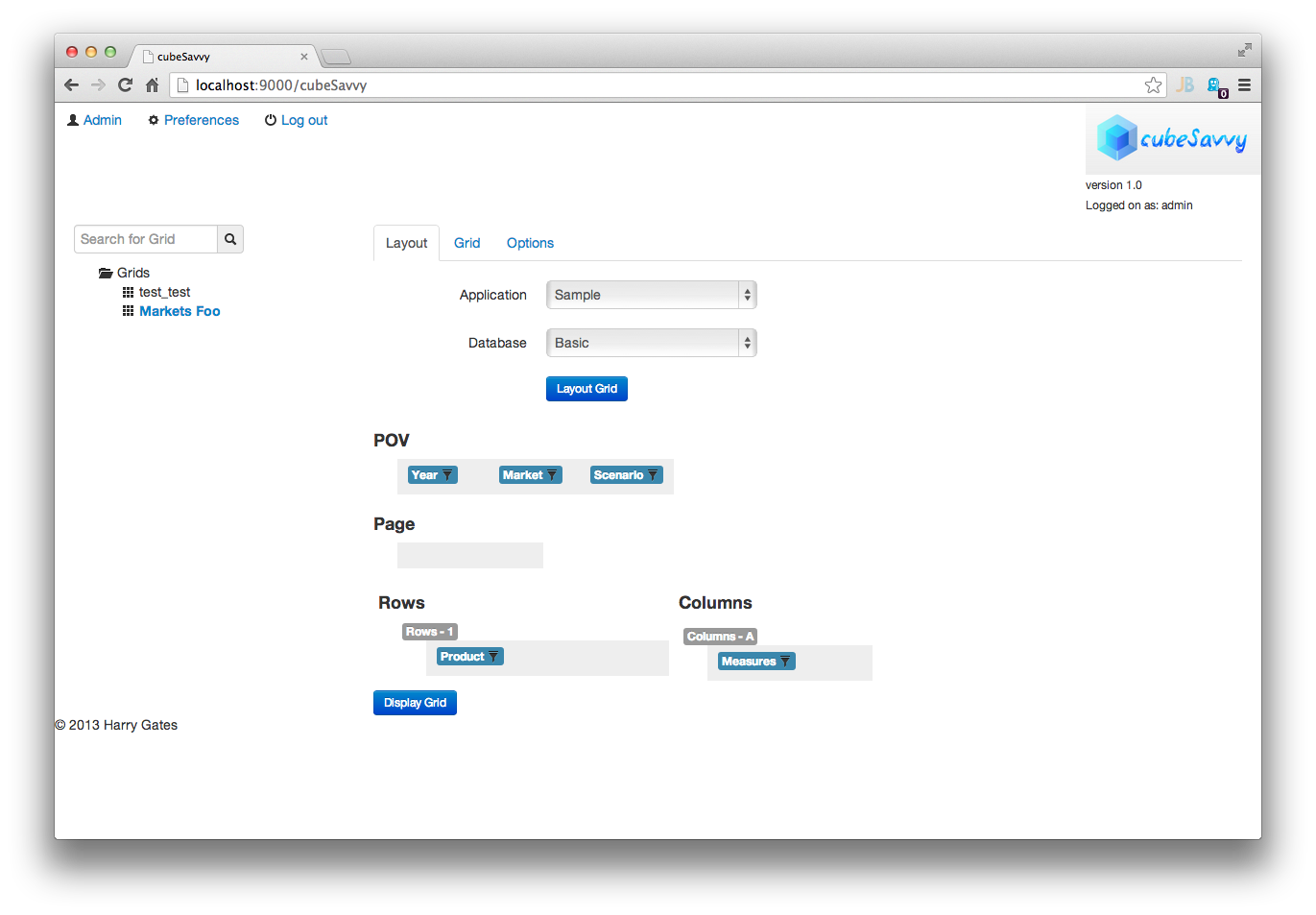
cubeSavvy defining a grid

cubeSavvy defining a grid

We can easily drag and drop members from the dimensions to the proper “slot”. Those of you familiar with Planning will be comfortable with this. We can dive deeper on a particular node in the configuration to define which members and children of members to include:
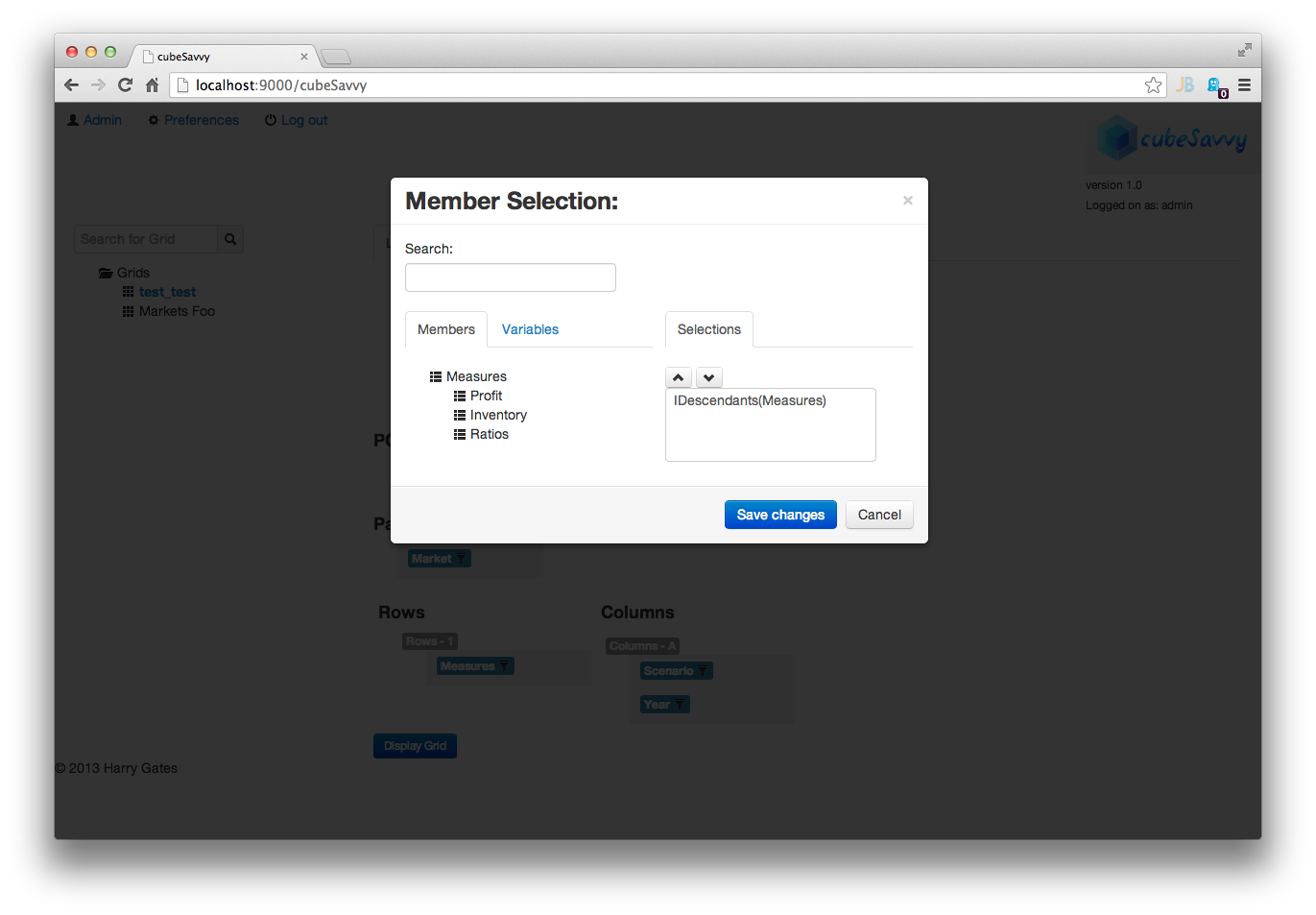
cubeSavvy member selection

cubeSavvy member selection

All in all, the grid definition and member configuration process is pretty smooth. Along with defining the grid, we can also define a calc to run when the grid is submitted/saved by a user. Again, this is pretty standard fare for those familiar with Planning. It’s typical to need to aggregate some values up after the user hits submit, or perform some other calculation.

User Experience

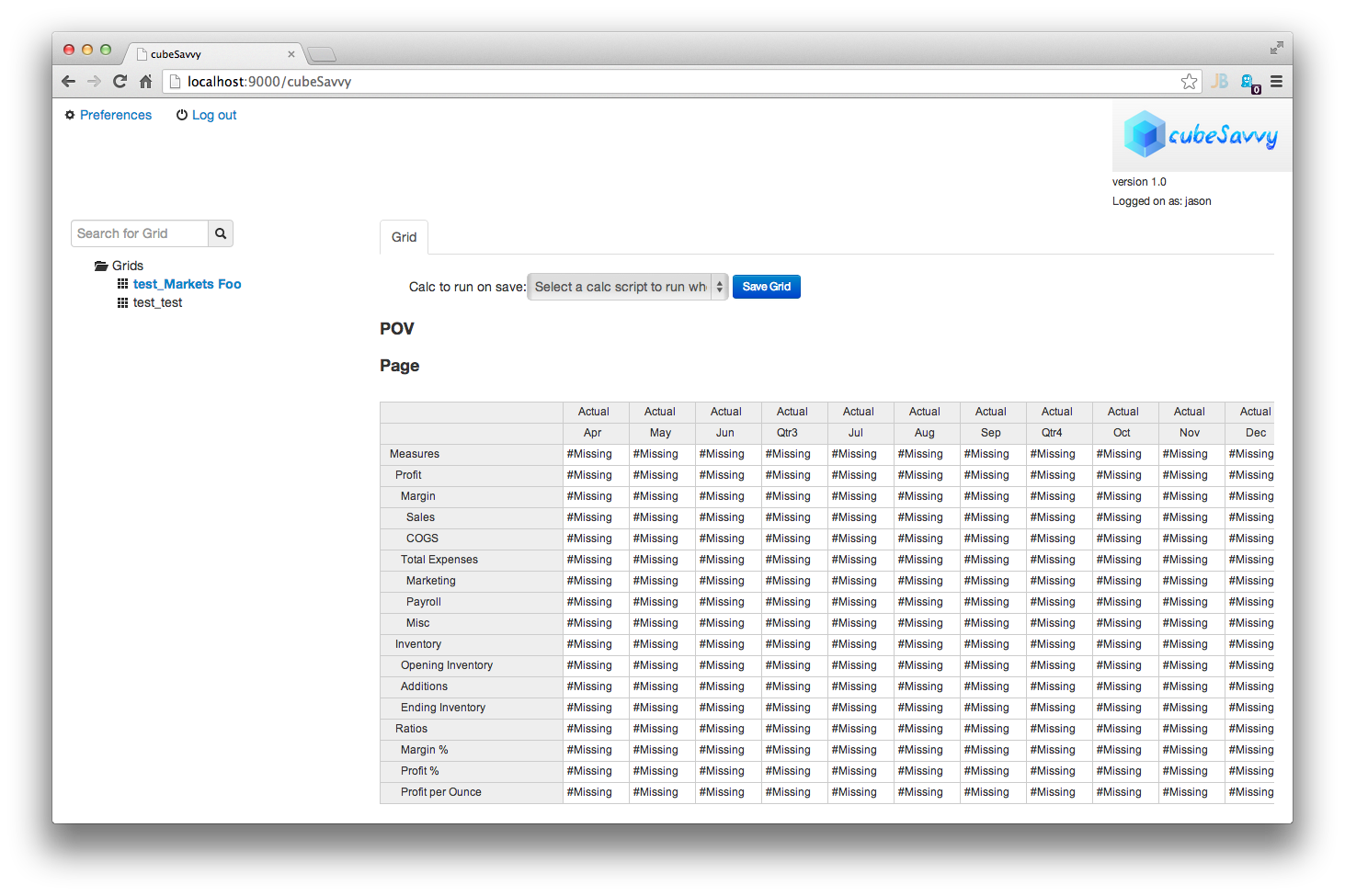
At present, cubeSavvy allows for the definition of grids (including their dimensionality, calcs, and so on), and also allows for organizing grids into folders to help organize them for the users. Most likely the folders will be used to organize things along certain steps in a process or around certain operational areas. For the user’s part, they login to cubeSavvy using their browser, and are then presented with a list of grids. Clicking on a grid brings it up with data:
cubeSavvy user grid


As this is a user-based system with the express intent of soliciting input from users, it’s a simple matter of inputting the data. Just click on a cell and type in a new value. This is pretty much the crux of the cubeSavvy user experience right now: load a grid, dial in the page if needed, see refreshed data, make edits if needed, submit data. Conceptually this is similar to the Planning experience.


Closing Thoughts

I have been pleasantly surprised with the functionality afforded by cubeSavvy even this early in its development. The “basics” are all more or less in place. cubeSavvy is not without its faults or defects though: I did experience a handful of issues during testing that required me to either manually refresh the page or navigate to a different section and then back to the section I wanted to be in. I imagine this is to be expected for now and am sure that Mr. Gates is hard at work on fixes for the issues I experience, if they haven’t been fixed already.

As I mentioned on the first page, I find myself intrigued with the cubeSavvy value and administration proposition, which is dispensing with some of the complexity of Planning (and its deployment) and going back to a more Essbase-centric view of the world. This is a possibly interesting solution for those people not wanting to make the leap to Planning but wanting to have a web interface in front of their cubes.

At this point in time, I think cubeSavvy would be well-served to take the following course of action:

  1. Focus on a polished user experience. There are just simply some kinks that need to be worked out to make the user experience smoother: bug fixes, text prompts, and the like.
  2. Adopt a strong visual identity. Speaking as no stranger to web development, using Bootstrap is a great foundation to build on. This provides for broad browser support right out of the gate and also allows for relatively easy theming. I would love to see cubeSavvy adopt either a high-quality or even a custom theme to really make it feel like its own entity rather than just the Bootstrap defaults.
  3. Really embrace the notion of being a front-end to Essbase and innovating on the Planning/planning experience (note that I mention Planning with a capital P and planning without a capital P). I think this is part of the game plan already, but thought I’d say it explicitly.

I’m really looking forward to seeing this project evolve and mature over time into a useful tool. If for whatever reason the business side doesn’t pan out, I think cubeSavvy would make a great candidate for an open source, community development driven project.

Keep up the great work, Harry.